Business process automation examples for small businesses are easy to cite and harder to judge.
Most founders know which work repeats. The harder question is whether that repetition is stable enough to automate safely, still missing a critical control, or carrying a consequence the automation should not touch. The same recurring task can land in all three categories depending on the architecture around it.
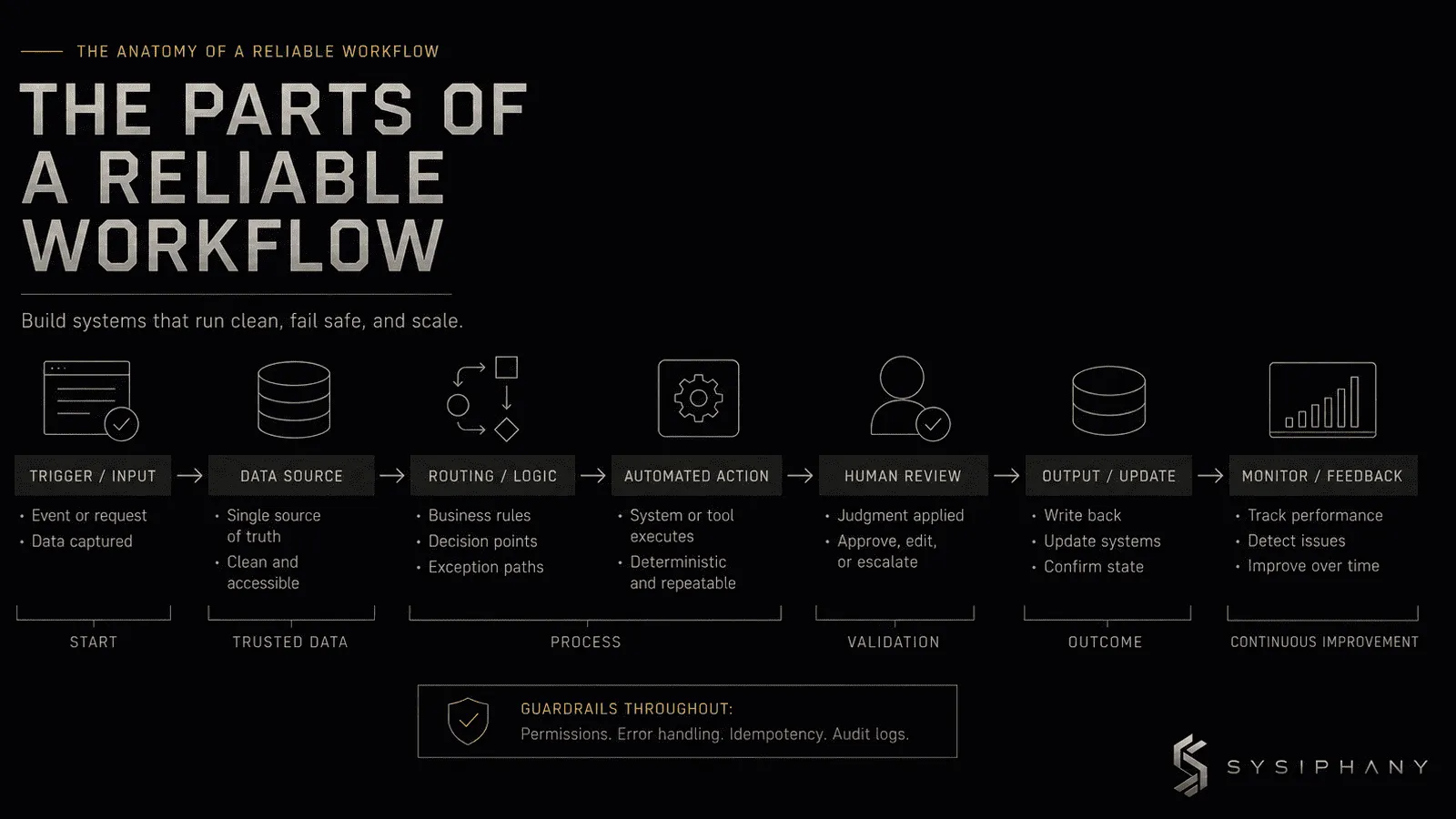
This article gives seven concrete examples and grades each on trusted source, clear owner, deterministic rules, exception path, human review boundary, and recovery. The point is not to expand a to-do list. It is to teach you to see the same pattern in your own business and recognize which flag is missing before you build or buy anything.
If you are still choosing candidates, the business-process automation selection guide explains how to sort workflows by readiness. This article assumes that step is past and you want examples. For the narrower sequence on which workflows are worth automating first, read AI Automation for Small Business: What to Automate First.
Process trust is not a software setting. It is an operating discipline.
Quick answer: What are business process automation examples for small businesses?
Business process automation examples for small businesses are recognizable workflow patterns — lead intake, invoicing, scheduling, complaints, reporting — that follow the same operating architecture: a trigger, trusted information, a stable rule, a named owner, exception handling, and recovery.
Most work worth automating is boring, frequent, and low-consequence. Most work that gets a business in trouble is judgment-heavy, exception-heavy, or touches customer or financial consequence. That is why it needs a clear boundary — not more automation.
What are business process automation examples for small businesses?
Business process automation examples for small businesses are not a vendor comparison. They are recognizable workflows: a form is submitted, an invoice arrives, a meeting ends, a customer message lands, a calendar window closes, a weekly report is due, an exception request crosses the threshold.
Same verb. Different architecture.
It matters whether the information the workflow reads is authoritative, whether one person owns the outcome, whether the rule is stable enough to encode, and what happens when the case falls outside the normal path. Two workflows can look identical in description and have very different automation risk depending on how those pieces are arranged.
Below, each example is graded. The grade is a snapshot of the workflow as it usually operates in a small business today. Clarify one missing piece — ownership, exception owner, source of truth, review rule — and a conditional workflow can become automation-safe. Leave a gap in place, and a safe-looking workflow quietly accumulates risk.
How should you read these examples?
Each example answers the same operational question: if this workflow appears in its current state, how much architecture is already in place, and what is still missing?
The grade is not a permanent label. It is a snapshot of the workflow as found in most small businesses. A conditional workflow becomes safe when the missing control is named and assigned. An unsafe workflow becomes conditional when the business replaces undocumented founder judgment with visible decision rules and a named exception owner.
If you recognize your own work in the pattern but not in the grading, the gap is the architecture you need, not a better tool.
Example 1: New lead form → CRM record plus owner assignment
Automation-safe.
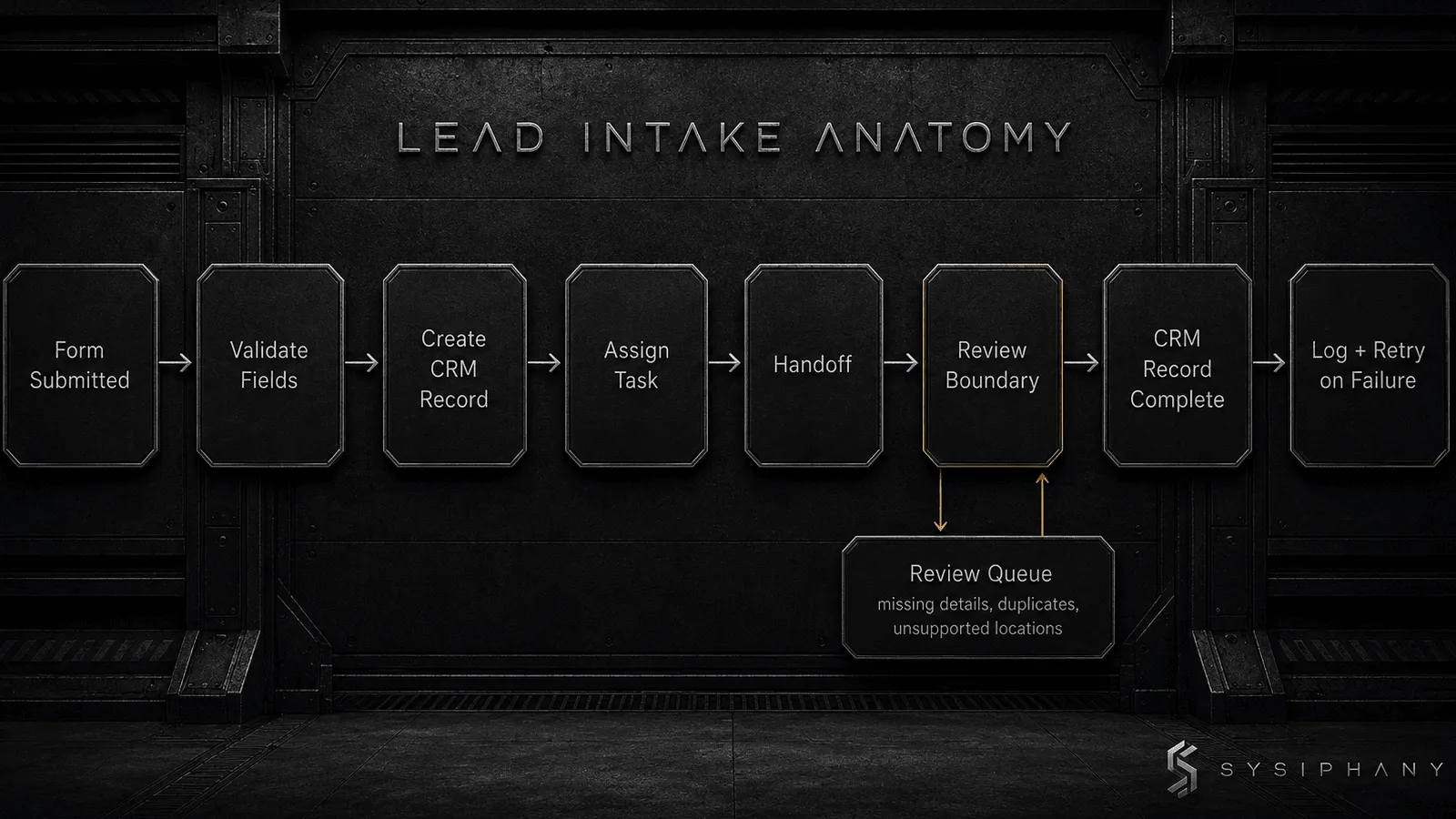
The trigger is visible: a form is submitted. The source of truth is the form submission itself. The rule is straightforward — validate required fields, reject obvious spam, route by service or territory. The action is creating or updating the CRM record and assigning a task.
The owner is the account manager. The handoff is the assigned task with the required context, not only a notification. The review boundary appears when the lead requires a customer-facing response about scope, pricing, or availability — those belong to a person. The exception path handles missing details, duplicate records, unsupported locations, or uncertain AI classification by routing to a visible review queue owned by sales operations. Failed record creation is logged, retried, and escalated to the same owner if the retry fails.
This workflow is automation-safe because every control lives in a reliable system. The CRM is the authoritative lead record. The owner is named. The exception owner is named. The review boundary is defined by consequence, not by habit.
Example 2: Invoice received → line-item extraction plus filing plus approval routing
Automation-safe with one required guardrail.
The trigger is document arrival. The source of truth is the approved invoice document matched to the purchase order or approval record. The rule checks vendor, amount, PO number, line-item count, and approval threshold. The action files the record, stores the document, posts the line items, and routes the approval task.
The owner is accounts payable or operations. The review boundary sits at the approval threshold: anything above the named limit pauses for human sign-off. The exception path handles mismatched totals, missing PO numbers, duplicate invoice numbers, and calendar or access failures by routing to a visible review queue. Recovery includes bounded retries and audit logging so the workflow resumes safely or stops without losing the document.
This workflow is safe as long as the PO or approval record is the winning truth. If the business still checks email, inbox tags, and a spreadsheet to learn what was approved, the automation is working but the source of truth is not. In that case the grading is conditional.
Example 3: Call or meeting ends → AI summarizes, extracts action items, drafts follow-up
Conditional.
The trigger is meeting end or transcript upload. The source of truth is the approved transcript or notes record, not scattered recollections. This is where most small businesses stumble. If the team agrees that the transcript or approved notes document is the canonical record, and the workflow reads only that source, the workflow is well defined. If notes live in email, Slack, personal files, and the CRM, the workflow has no trusted input.
The action is an AI-generated summary and action-item draft. The rule determines confidence, assigns owners, and routes. The owner is the meeting owner or account manager. The human review boundary is non-negotiable: a person confirms decisions, edits the action items, and records the approved version in the canonical source. The exception path includes low-confidence extraction, unassigned items, and scope changes the AI missed.
When AI drafts minutes, action items, or summaries, the workflow needs a human review step that checks against approved notes or recordings — not against the AI’s confidence level. Reviewers tend to accept plausible summaries as accurate even when the AI omitted key commitments, speakers, or action items.
Example 4: Friday afternoon → compiled weekly ops digest from project, CRM, inbox, and Slack
Conditional — often fails at the first check.
The trigger is time, which is stable. The intent is useful. The problem shows up in scope and source.
A weekly digest pulls from project status, support tickets, client emails, financial updates, and team messages. Each source may carry a different version of the truth. If the business has a source-of-truth map, the workflow summarizes from approved systems and flags missing updates. If it does not, the digest quietly encodes whatever the most recent message happened to say.
The owner is usually the founder or operator. The review boundary is where the workflow breaks: the founder cannot tell which source is more reliable, so they recheck every entry. The exception path handles missing updates, conflicting status, and unusual commitments. Recovery routes unresolved items back to the owning role with context, not silently omitting them.
When source-of-truth confusion is the real problem, automation makes the confusion faster. The operating question is not which reporting tool to buy. It is which system owns each category of truth.
Example 5: Appointment booked → confirmation, 24-hour reminder, 2-hour reminder, reschedule prompt
Automation-safe.
This is one of the cleanest patterns because the trigger, input, rule, action, owner, and recovery are almost always present.
The trigger is booking or status change in the calendar or booking system. The source of truth is the calendar record. The rule is fixed: if status is confirmed and the message window is inside the threshold, send. The action is sending the correct message at the correct interval. The owner is usually the account manager or front desk role. The exception path handles reschedules, cancellations, timezone mismatches, calendar sync failures, and contact-bounce notifications by routing to a visible queue. Recovery re-sends the correct message once the calendar state is accurate.
The human review boundary is narrow but real: if the message mentions scope, price, availability, or new terms, a person must approve it before it goes out. A generic reminder about an existing booking does not.
Example 6: Customer message arrives → classify, draft reply, suggest knowledge-base article, escalate if upset
Conditional.
The trigger is message arrival. The source of truth is the ticket or message record. The action is AI classification, sentiment assessment, reply suggestion, and KB routing. The owner is support. The handoff is the queued task with summary, sentiment flag, and suggested next step.
This pattern is conditional because the exceptions are where the customer relationship lives. A shipping delay can begin as a drafted response. A frustrated customer, refund request, legal concern, or repeated service failure should pause for human review. The workflow must define the escalation rule: what topic combination, sentiment threshold, or customer tier triggers human ownership, and what that person must do.
When the escalation rule is clear, this pattern removes preparation work without removing accountability. When the rule is vague, the AI behaves like a person while no one is actually responsible for the outcome. That is not leverage.
Example 7: Credit, refund, scope change, or contract exception request arrives
Unsafe in its present state.
The trigger is a request that falls outside normal policy. The source may be email, phone, ticket, or a verbal conversation. The action touches money, terms, or relationship trust. The owner must be a person who can accept accountability for the decision.
Automation here takes three common shapes, each with a hidden failure: auto-approving within a threshold, drafting a response without review, or sending an acknowledgment that sounds like a commitment. Each shape removes a control the business does not have the right to surrender.
The exception path is not a secondary concern here. The exception is the workflow. The only safe automation is preparation: gathering the relevant order record, customer history, policy context, and prior exceptions for the human decision-maker, then recording the approved outcome in the canonical system. This example becomes safe when the founder has extracted the decision rule and named who actually owns exceptions — not when the team buys a tool.
For the sequence from candidate to built workflow, read How to Automate a Business Process. For the architecture each example still needs, see Workflow Automation for Small Business.
How do you tell whether an example fits your business?
Do not hunt for the example name. Hunt for the pattern.
If you find the same architecture in your own workflow — same trigger, same source, same owner, same review point, same exception path — then the example likely fits. If you cannot name the owner, the exception owner, and the definition of done, the example describes what the workflow should become, not what it already is.
An operational audit before implementation is useful when several of these examples feel unfamiliar underneath your own descriptions. Sometimes the business is doing the work, but the architecture is missing.
Are examples useful before choosing AI tools?
Very useful, and for the opposite reason most founders think.
Examples reveal whether the workflow is ready for a tool at all. A founder who recognizes their intake flow in Example 1 is closer to a useful vendor conversation than a founder who answers every support question because the workflow has no owner. You do not need more tools. You need operating clarity.
The AI tools selection framework explains how to sequence workflow clarity, ownership, and review boundaries before comparing vendors. The sequence matters.
What should a founder do if they recognize their workflow above?
Start with the missing control, not with a purchase order.
Work through one example and name what is missing. If the source of truth is scattered, fix that first. If nobody owns the exception, name the owner. If the review boundary is unclear, state the condition that triggers human judgment before the automation continues. Each control that becomes visible is a unit of leverage.
The Operational Drag Diagnosis Kit is a practical first step. It helps founder-led teams inspect ownership gaps, truth-source conflicts, handoff failures, and AI-readiness risk without adding another tool to an already unclear workflow.
Download the Operational Drag Diagnosis Kit
FAQ
What are common examples of business process automation for small businesses?
Common examples include lead intake and CRM routing, invoice processing and approval routing, appointment scheduling and reminders, meeting recap and action-item capture, weekly status digest preparation, customer message classification and escalation, and new-hire onboarding administration.
Do small businesses need AI to automate business processes?
No. Many small-business automation examples use deterministic rules — validation, routing, reminders, record updates, notifications — without AI at all. AI becomes useful when the workflow must interpret variable text, documents, or conversations.
What is the difference between examples and an automation scorecard?
Examples help a founder recognize a pattern they already perform. A scorecard helps rate that pattern across frequency, stability, source of truth, ownership, risk, and reversibility. Examples are pattern recognition. The scorecard belongs in the candidate selection guide.
How does source of truth affect automation examples?
Two workflows can look identical but carry very different automation risk if the information the automation reads is disputed. A lead-intake example is safe when the CRM is the winning source and conditional or unsafe when the team still acts from the inbox, Slack, and the CRM simultaneously.
Can a small business automate a process without mapping it first?
Technically yes, but it should not expect reliable results. Automation performs the logic it is given. If the logic is implicit, the exceptions are invisible, and ownership is assumed, the business has automated movement, not a workflow.
Are some business processes always unsafe to automate?
Processes involving customer promises, pricing exceptions, refunds, credit decisions, hiring or firing, legal commitments, strategic tradeoffs, or any case where the issue is ambiguously exceptional and the founder is the only one who knows the standard should not be fully automated without explicit decision rules, review boundaries, and named ownership.