
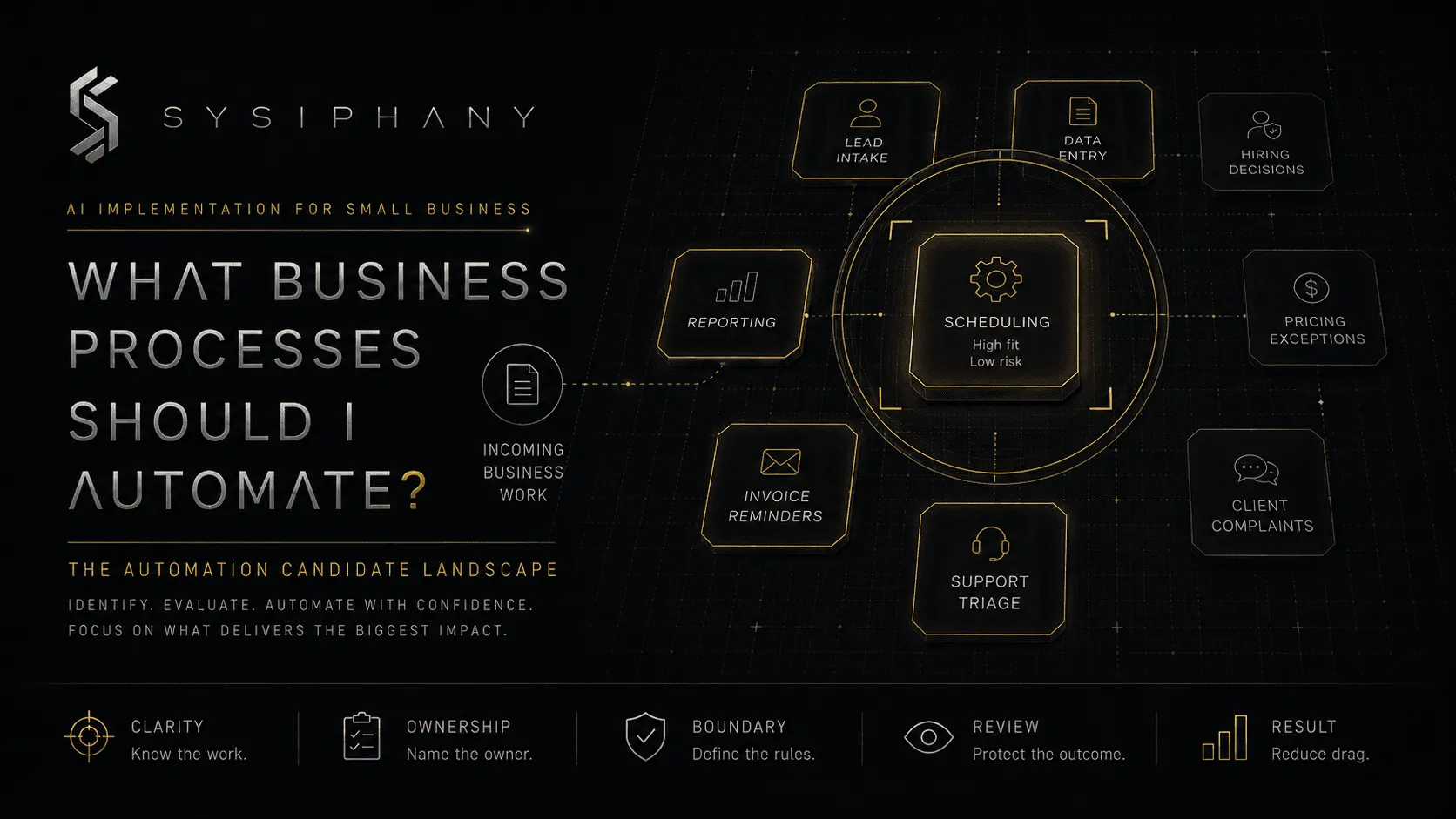
Most founders asking, “What business processes should I automate?” are not looking for a lecture on automation.
They want a shortlist.
They want to know which work can leave the team’s plate, which work AI can help with, and which work still needs a person paying attention.
That shortlist is useful only when it separates repetition from readiness.
A task can happen every day and still be a poor automation candidate. The team may disagree about who owns it. The required information may live in three places. The normal path may be clear while every meaningful exception still routes through the founder.
The work repeats.
The process is not stable.
That distinction decides whether automation removes workload or creates a faster version of the same confusion.
Quick answer: what business processes should I automate?
Automate business processes that are frequent, repeatable, low-risk, clearly owned, tied to a trusted source of truth, and easy for a human to review or reverse when something goes wrong.
Strong candidates usually include:
- Lead intake and routing
- Meeting summaries and action-item preparation
- Form-to-CRM data entry
- Internal reminders and task creation
- Routine document preparation
- Invoice reminders
- Status update collection
- Report preparation
- Support ticket classification
- FAQ response drafts
- File organization and record updates
Processes that usually need more clarity first include:
- Pricing exceptions
- Client promises
- Refund decisions
- Sensitive complaints
- Scope changes
- Hiring and firing decisions
- Financial approvals
- Strategic tradeoffs
- Work that still depends on founder memory
A useful rule is:
Automate movement before judgment.
Move information. Create tasks. Prepare drafts. Route requests. Collect updates. Flag exceptions.
Keep people responsible for meaning, trust, approval, unusual cases, and consequences.
For a narrower sequence on where to begin, read AI Automation for Small Business: What to Automate First.
What makes a business process a good automation candidate?
A good automation candidate is a process with a stable trigger, recognizable pattern, clear inputs, defined owner, predictable output, manageable risk, and a known exception path.
The strongest candidates share seven traits.
1. The process happens often
Daily and weekly work creates more leverage than a task performed twice a year.
Frequency alone is not enough, but it matters. A ten-minute task repeated 40 times per week may be a better candidate than a three-hour task completed once per quarter.
2. The normal path is repeatable
The work follows a recognizable sequence.
The inputs may vary, but the process does not require a new strategy each time. The team can explain what usually happens, what comes next, and what counts as complete.
3. The input is available and trustworthy
The automation knows where to get the information it needs.
That might be a form, CRM record, approved spreadsheet, call transcript, support ticket, project board, or document repository.
When the team does not trust the source, automation inherits the trust problem. That is why source-of-truth clarity matters more than adding another tool.
4. The output is specific
A good automation produces something concrete:
- A task
- A summary
- A draft
- A label
- A notification
- A record update
- A routed request
- A prepared report
“Help with operations” is not an automation output.
“Create a delivery task when a deal reaches Closed Won and attach the approved handoff brief” is.
5. Someone owns the result
Automation can move work. It cannot own the outcome.
A person or role still needs responsibility for what happens after the workflow runs. When ownership is unclear, automation creates orphaned tasks, ignored alerts, duplicate records, and more cleanup.
6. Errors are visible and recoverable
Early automation candidates should be easy to check and correct.
A mislabeled internal message is recoverable. An unauthorized refund, wrong client promise, or missed compliance escalation carries more consequence.
The easier the mistake is to detect and reverse, the safer the pilot.
7. The exception path is known
Every useful process eventually leaves the standard path.
The automation needs to know when to stop, request missing information, route to a specialist, or ask for human review.
Without an exception path, the system must guess or fail silently.
Neither is acceptable.
The Automation Candidate Map
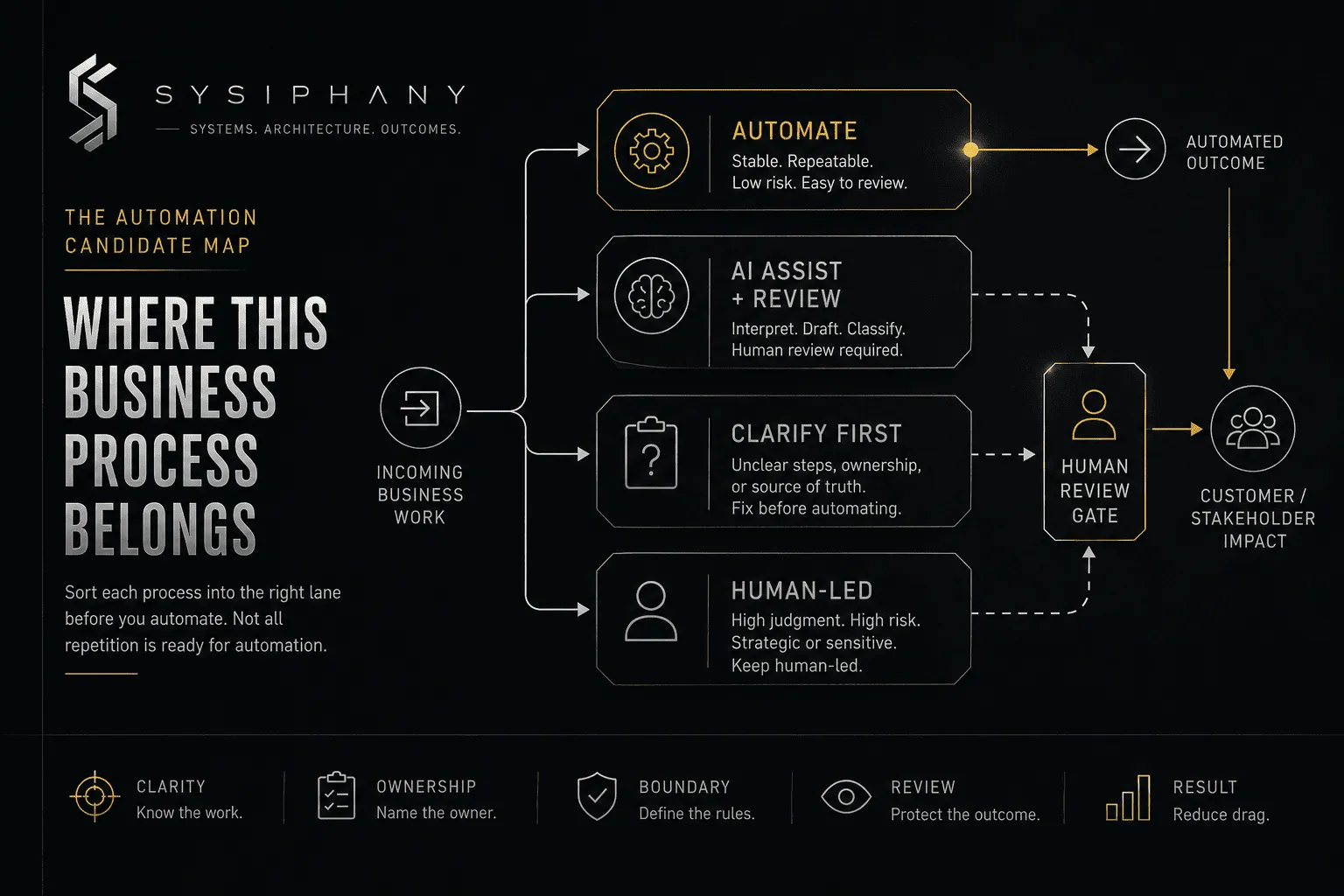
The Automation Candidate Map sorts each process into one of four lanes: automate, assist, clarify, or keep human-led.
Lane 1: Automate
Use automation when the process is frequent, stable, low-risk, clearly owned, and easy to monitor.
Examples:
- Creating a task from an approved form submission
- Sending an internal reminder when a deadline approaches
- Updating a status field after a defined event
- Moving approved data between systems
- Collecting routine updates into a weekly digest
- Sending a standard confirmation message
These workflows do not require the system to invent policy or interpret an unusual situation.
Lane 2: Use AI assistance with human review
Use AI assistance when the work benefits from interpretation, drafting, summarizing, or classification, but a person should still approve the outcome.
Examples:
- Drafting a client follow-up
- Summarizing a discovery call
- Classifying an inbound support request
- Extracting action items from meeting notes
- Preparing first-pass report commentary
- Suggesting a response to a common question
This is often the best starting lane for AI workflow automation.
AI prepares the work.
A human owns the decision.
Lane 3: Clarify before automating
Clarify the process first when people disagree about the steps, owner, source of truth, decision rule, handoff, or definition of done.
Examples:
- Sales closes a deal, but delivery does not know what was promised
- A customer issue moves between inbox, Slack, and the CRM
- Three systems show different project status
- Every scope exception requires a founder interpretation
- People perform the same task in different ways
- An approval exists, but nobody knows the threshold
This is where automation pressure often exposes a larger operating problem.
The team does not need a more sophisticated workflow yet.
It needs a clear one.
Lane 4: Keep human-led
Keep the process human-led when it depends on trust, accountability, ethics, sensitive context, strategic judgment, or high-consequence exceptions.
Examples:
- Resolving a serious customer complaint
- Approving a pricing exception
- Changing contract terms
- Making a hiring or termination decision
- Deciding whether to accept unusual financial risk
- Navigating a strategic tradeoff
- Repairing a damaged client relationship
AI can still prepare context, summarize history, or draft options.
The final judgment belongs to a person.
How do I score a process before automating it?
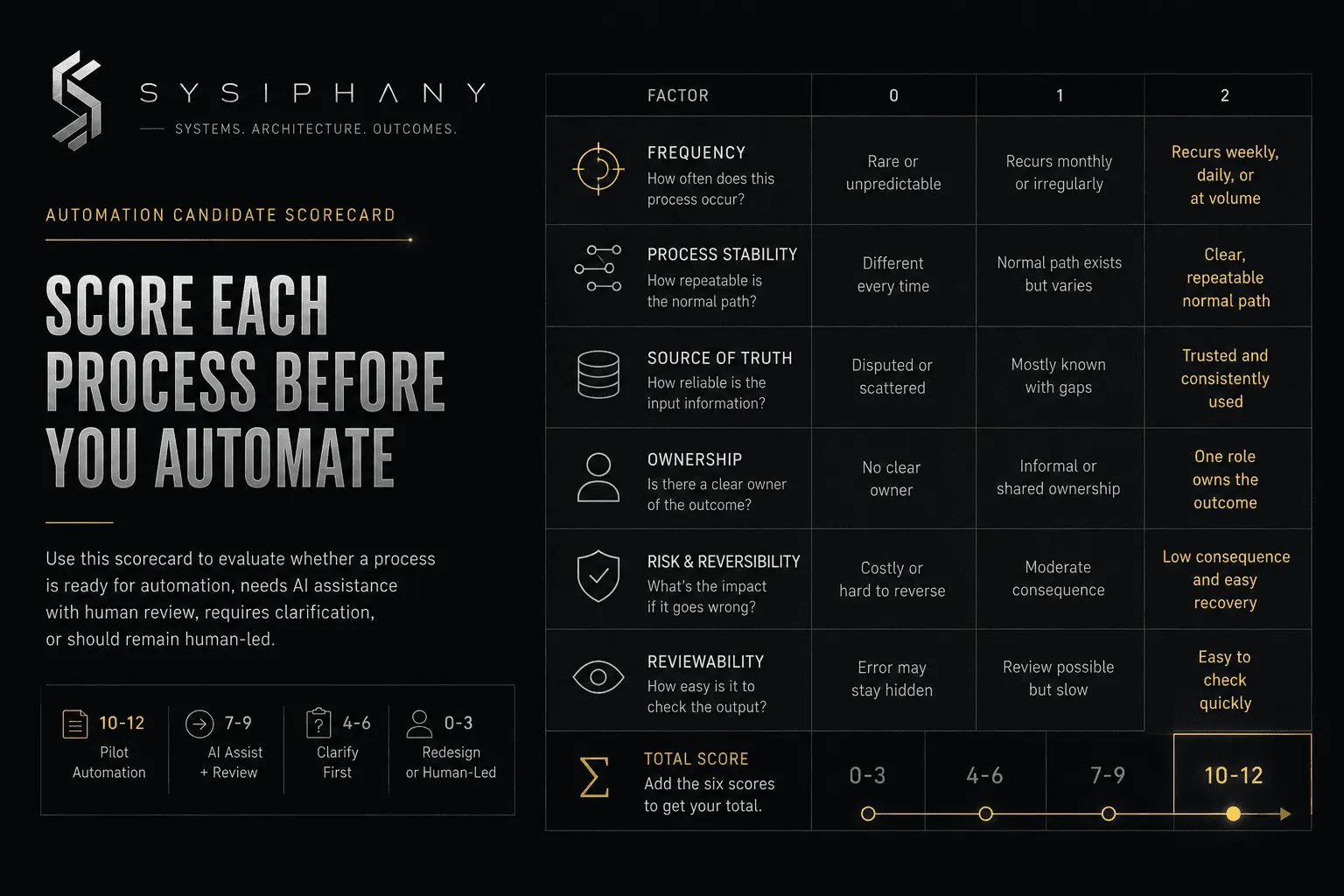
Score a process across frequency, stability, source of truth, ownership, risk, and reviewability before deciding whether to automate it.
Use a score from 0 to 2 for each factor.
| Factor | 0 | 1 | 2 |
|---|---|---|---|
| Frequency | Rare or unpredictable | Recurs monthly or irregularly | Recurs weekly, daily, or at volume |
| Process stability | Different every time | Normal path exists but varies | Clear, repeatable normal path |
| Source of truth | Disputed or scattered | Mostly known with gaps | Trusted and consistently used |
| Ownership | No clear owner | Informal or shared ownership | One role owns the outcome |
| Risk and reversibility | Error is costly or hard to reverse | Moderate consequence | Low consequence and easy recovery |
| Reviewability | Error may stay hidden | Review is possible but slow | Output is easy to check quickly |
Add the six scores.
- 10–12: Pilot automation. The process is a strong candidate for controlled automation.
- 7–9: Use AI assistance or partial automation. Keep a human review point.
- 4–6: Clarify the workflow first. Fix the weak factors before connecting tools.
- 0–3: Redesign or keep human-led. The process is not ready to automate.
The score does not override judgment.
A high-frequency process involving employment decisions, legal exposure, sensitive complaints, major financial commitments, or client promises still needs stronger human control.
Which sales processes should I automate?
Small businesses should automate sales administration, routing, preparation, and follow-up support before automating pricing, promises, or relationship-sensitive judgment.
Good candidates include:
- Capturing leads from forms and email
- Enriching approved lead records
- Assigning leads by territory, service, or qualification rule
- Scheduling meetings
- Preparing call briefs
- Summarizing sales calls
- Drafting routine follow-ups
- Creating CRM tasks
- Flagging stale opportunities
- Collecting missing intake information
The guardrail is authority.
An automation can confirm that an inquiry was received. It can summarize the need. It can route the lead and prepare the next step.
It should not casually promise availability, quote custom pricing, change terms, or commit delivery capacity.
When the sales team still asks the founder what is safe to offer, the next asset is usually a decision rule or approval threshold.
Which operations and delivery processes should I automate?
Operations and delivery processes are strong automation candidates when the handoff, owner, required inputs, status rules, and exception path are already clear.
Good candidates include:
- Creating projects from approved deals
- Generating standard task sets
- Assigning recurring work
- Sending deadline reminders
- Collecting status updates
- Flagging missing inputs
- Preparing handoff documents
- Routing completed work for review
- Updating internal dashboards
- Archiving approved files
The risk appears at the handoff.
An automation can move a project from sales into delivery. It cannot repair a vague promise, missing scope, unclear deadline, or absent client context.
When delivery keeps asking what sales sold, the first fix is a handoff standard. Automation comes after the required handoff package is defined.
This is the broader reason an operational audit should come before AI implementation.
Which customer service processes should I automate?
Customer service processes are good candidates for classification, routing, information retrieval, and response drafting when escalation rules protect sensitive or unusual issues.
Good candidates include:
- Classifying tickets by topic
- Detecting missing order or account details
- Routing requests to the right queue
- Drafting answers to common questions
- Suggesting knowledge base articles
- Summarizing conversation history
- Flagging urgency or customer frustration
- Preparing internal escalation notes
- Sending simple status confirmations
Keep a person involved when the issue includes:
- Refunds or credits
- Repeated service failure
- Legal or safety concerns
- Contract ambiguity
- Threats to cancel
- Public reputation risk
- High-value accounts
- Unusual exceptions
- A customer asking for a commitment outside policy
The goal is not to make support feel automated.
The goal is to remove repetitive preparation while protecting the moments where trust matters.
Which finance and administrative processes should I automate?
Finance and administrative processes are useful automation candidates when the workflow handles collection, preparation, reminders, and record movement rather than uncontrolled approval or cash decisions.
Good candidates include:
- Capturing receipt data
- Preparing invoice details
- Sending payment reminders
- Matching documents to records
- Flagging missing fields
- Organizing approved files
- Preparing recurring reports
- Collecting timesheets or expense submissions
- Routing invoices for approval
- Creating follow-up tasks for overdue items
Keep humans responsible for:
- Approving payments
- Changing bank details
- Granting credits
- Writing off balances
- Making tax or legal judgments
- Accepting unusual financial exposure
- Resolving discrepancies that affect customers or vendors
Automating preparation can remove hours of manual work.
Automating authority requires stronger controls.
Which marketing processes should I automate?
Marketing processes are strong candidates for research preparation, repurposing, scheduling support, data organization, and first drafts when a human still owns positioning, claims, and brand judgment.
Good candidates include:
- Turning a webinar into draft clips and posts
- Preparing content briefs
- Organizing customer questions by theme
- Summarizing campaign performance
- Drafting email variations
- Formatting approved content for different channels
- Tagging leads by source
- Preparing publishing checklists
- Scheduling approved content
- Flagging outdated website copy
Keep people responsible for:
- Brand positioning
- Factual claims
- Customer proof
- Sensitive responses
- Public controversy
- Strategic messaging
- Final publication of high-trust content
AI can expand production capacity.
It should not quietly redefine what the company believes or promises.
Which HR and people processes should I automate?
HR and people processes are appropriate for scheduling, document collection, onboarding administration, reminders, and information access, while employment judgment stays human-led.
Good candidates include:
- Interview scheduling
- Collecting onboarding documents
- Creating onboarding task lists
- Sending policy acknowledgments
- Routing time-off requests
- Reminding managers about review dates
- Answering routine internal policy questions from approved sources
- Preparing training checklists
- Tracking equipment assignments
Keep people responsible for:
- Hiring decisions
- Termination decisions
- Performance conclusions
- Disciplinary action
- Compensation exceptions
- Accommodation requests
- Sensitive employee complaints
- Legal or policy interpretation
This is a clear boundary.
Automation may support the process.
Leadership remains accountable for the person.
Which founder and leadership processes can AI support?
AI can support founder and leadership workflows by preparing information, surfacing repeated decisions, and reducing administrative review without owning strategic judgment.
Useful candidates include:
- Weekly operating summaries
- Meeting preparation
- Decision-log drafts
- Status digest preparation
- Repeated-question analysis
- Drafting internal updates
- Organizing customer feedback
- Identifying unresolved owners or deadlines
- Summarizing exceptions that require review
A founder should be cautious when the workflow asks AI to infer invisible judgment.
The founder may know which client can absorb a delay, when to bend a policy, which employee needs context, or which opportunity is worth the risk. If that reasoning exists only in memory, AI cannot reliably inherit it.
The reasoning first needs to become visible through:
- Decision rules
- Examples
- Approval thresholds
- Escalation triggers
- Exception guides
- Review standards
This is how founder dependency decreases without pretending that founder judgment no longer matters.
For the capacity implications, read Scaling Operations Without Adding Headcount.
What business processes should I not automate?
Do not fully automate a business process when the workflow is unclear, the source of truth is disputed, the output creates a high-consequence commitment, or the work requires context the system cannot reliably access.
Pause before automating when:
- Nobody can explain the process the same way
- The process changes every time
- Multiple tools contain conflicting information
- The founder resolves most exceptions
- The output affects money, employment, safety, legal exposure, or customer trust
- A mistake would be hard to detect
- A mistake would be hard to reverse
- No one owns the result
- There is no escalation path
- The team already ignores the current alerts and tasks
The last point matters.
A technically successful automation can still fail operationally.
It can create the task, send the alert, update the field, and produce the summary exactly as designed. If nobody knows what happens next, the automation has only generated cleaner-looking neglect.
How do I prepare a process for automation?
Prepare a process for automation by defining the trigger, inputs, source of truth, owner, normal path, decision rules, exceptions, review point, and definition of done.
Use this sequence.
-
Name the process.
Keep the scope narrow enough to explain. -
Identify the trigger.
State exactly what starts the workflow. -
List the required inputs.
Define what information must exist before work can continue. -
Choose the source of truth.
Decide which system wins when records disagree. -
Assign the owner.
Name the role responsible for the outcome. -
Map the normal path.
Document the smallest useful sequence from trigger to completion. -
Write the decision rules.
Define thresholds, routing logic, and approval boundaries. -
Define the exception path.
State when the automation stops or escalates. -
Add the review point.
Match human oversight to the level of risk. -
Define done.
Make completion visible and measurable.
Atlassian’s guide to process automation recommends mapping the process end to end, documenting responsibility, and looking for repetitive patterns and bottlenecks.
That is a useful starting point.
The additional small-business question is:
Does the bottleneck come from repetitive execution, or from missing ownership and judgment?
Only the first one is cleanly solved by automation.
Should I use traditional automation or AI workflow automation?
Use traditional automation for fixed rules and structured inputs; use AI workflow automation when the process must interpret text, documents, conversations, or other variable information.
Traditional automation works well for:
- If-this-then-that triggers
- Moving data between approved fields
- Creating tasks
- Sending reminders
- Updating status
- Routing based on fixed values
- Generating standard documents
AI workflow automation works well for:
- Summarizing
- Drafting
- Extracting information from unstructured text
- Classifying messages
- Identifying likely intent
- Comparing documents
- Preparing recommendations
- Detecting patterns for human review
The presence of AI does not remove the need for a stable workflow.
It increases the need for clear boundaries because the system can interpret more flexible inputs and produce more variable outputs.
For the broader implementation sequence, read AI Implementation for Small Business: How to Build AI That Actually Works.
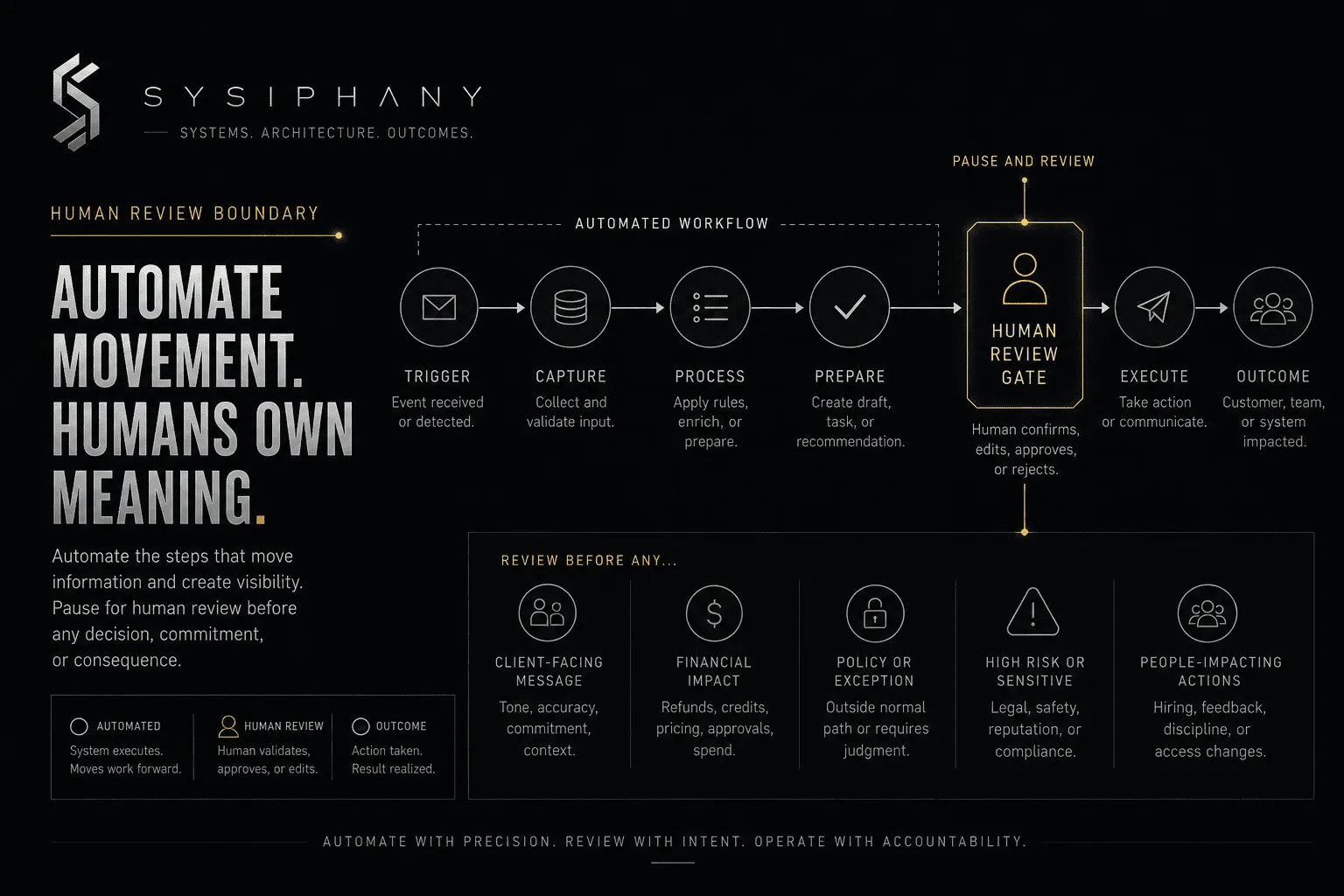
Where should humans review an automated process?
Humans should review an automated process before the workflow creates a meaningful commitment, affects a high-trust relationship, acts on low-confidence information, or enters an exception outside the normal path.
Useful human review points include:
- Before a client-facing message is sent
- Before a price or scope exception is approved
- Before a refund or credit is issued
- Before a sensitive complaint is closed
- Before a record with financial impact is changed
- Before a personnel action is taken
- When required information is missing
- When AI confidence is low
- When the request falls outside policy
- When the automation detects conflicting source data
Human review should be deliberate, not a permanent sign that nobody trusts the system.
Start with review where consequence is high. Measure accuracy. Remove unnecessary review only after the process proves stable.
Zapier’s Human in the Loop guidance provides a practical example: pause an automated workflow so a person can validate, correct, or add information before it continues.
How do I start automating my business without creating more work?
Start with one narrow process, establish a baseline, run a controlled pilot, and measure whether the automation reduced work across the whole workflow rather than shifting it somewhere else.
A practical first pilot looks like this:
- Choose one process with a score of 10 or higher.
- Remove any unnecessary steps before automating.
- Define the owner and exception path.
- Automate one part of the process.
- Keep human review at the point of consequence.
- Run the pilot for two to four weeks.
- Track time saved, errors, rework, escalations, and adoption.
- Fix the workflow before expanding it.
- Document the final operating rule.
- Move to the next candidate only after the first one is stable.
Subtraction comes before optimization.
A six-step process may become a three-step process before any automation is needed. A weekly report may disappear because nobody uses it. An approval may be replaced by a clear threshold. Two systems may become one source of truth.
That is still a successful automation assessment.
The goal is not to maximize the number of automations.
The goal is to reduce the work, confusion, delay, and founder dependency inside the business.
How do I measure whether business process automation worked?
Measure automation by whether it reduces total cycle time, manual touches, errors, rework, waiting, founder interruptions, and unresolved exceptions without lowering trust or quality.
Useful measures include:
- Time from trigger to completion
- Manual steps removed
- Hours returned to the team
- Error or correction rate
- Number of escalations
- Founder approvals required
- Work waiting without an owner
- Duplicate data entry
- Missed handoffs
- Customer complaints or corrections
- Percentage of outputs accepted without revision
- Team adoption
Be careful with “tasks automated” as a success metric.
An automation can run thousands of times while creating thousands of low-value notifications.
Measure the operating result.
Did the workflow get lighter?
Did it become clearer?
Did people stop asking the same question?
Did the work move without losing context?
Did the founder regain attention?
That is the return.
How do I find the right first process to automate?
Find the right first process by identifying where repetitive work overlaps with clear ownership, stable inputs, low consequence, and visible review.
The Operational Drag Diagnostic Kit helps you inspect the business before choosing the automation.
It is designed to surface:
- Repeated manual coordination
- Broken handoffs
- Unclear ownership
- Duplicate work
- Source-of-truth confusion
- Founder-dependent decisions
- Approval bottlenecks
- AI readiness risk
You may find a process ready to automate.
You may find a decision rule, handoff standard, source-of-truth map, approval threshold, or escalation rule that needs to exist first.
Both outcomes are useful.
Start with the Operational Drag Diagnostic Kit
Download the Operational Drag Diagnostic Kit
When should I get outside help with business process automation?
Get outside help when automation crosses multiple teams, depends on founder judgment, affects customers or revenue, involves conflicting systems, or keeps expanding beyond one clearly owned workflow.
A single internal reminder may not require outside support.
A sales-to-delivery-to-finance workflow with unclear promises, disputed status, and three sources of truth probably does.
The stronger signal is not complexity alone.
It is consequence.
When a poorly designed automation could create customer confusion, financial leakage, team resistance, or more founder cleanup, architecture matters before implementation.
Bring the workflow into a SYSIPHANY discovery call
Book a SYSIPHANY discovery call
FAQ
What business process should I automate first?
Automate a frequent, low-risk process with a clear trigger, trusted input, defined owner, predictable output, and easy human review. Lead routing, meeting summaries, reminders, task creation, record updates, and report preparation are common starting points.
How many business processes should a small business automate at once?
Most small businesses should automate one narrow process first, stabilize it, measure the result, and then expand. Launching several automations at once makes it harder to identify which workflow or rule caused a problem.
What repetitive tasks can be automated in a small business?
Small businesses can automate data entry, reminders, task creation, lead routing, scheduling, file organization, status collection, invoice reminders, meeting summaries, support classification, and routine draft preparation.
Can I automate a process that is not documented?
You can automate an undocumented process only when the people doing the work can explain the trigger, normal path, owner, output, exception path, and review point clearly enough to build and test it. Documentation does not need to be elaborate, but the operating logic must be visible.
What business processes should never be fully automated?
Processes involving sensitive customer relationships, legal or safety exposure, employment decisions, major financial commitments, ethical judgment, strategic tradeoffs, or unusual exceptions should not be fully automated without strong human accountability.
How do I know whether to use AI or traditional automation?
Use traditional automation when the rules and inputs are structured. Use AI when the workflow must interpret emails, calls, documents, or variable text. Use human review when the output creates risk, commitment, or consequence.
Can AI reduce workload if my workflows are messy?
AI may reduce isolated tasks inside a messy workflow, but it can also move unclear work faster into the next bottleneck. Clarify ownership, source of truth, handoffs, decision rules, and review points before treating the workflow as automated.
What is the difference between task automation and business process automation?
Task automation handles one repeatable action, such as creating a task or sending a reminder. Business process automation coordinates several connected steps, owners, systems, decisions, and handoffs from trigger to completion.
How do I calculate the ROI of process automation?
Calculate ROI by comparing implementation and operating cost against time saved, errors reduced, faster cycle time, fewer manual touches, lower rework, improved capacity, and reduced founder interruption. Include the time humans spend reviewing and correcting the automation.
Final rule
The best process to automate is not the one that looks most impressive in a demo.
It is the one the business understands well enough to trust.
Clear trigger.
Clear truth.
Clear owner.
Clear boundary.
Clear review.
Then automate.