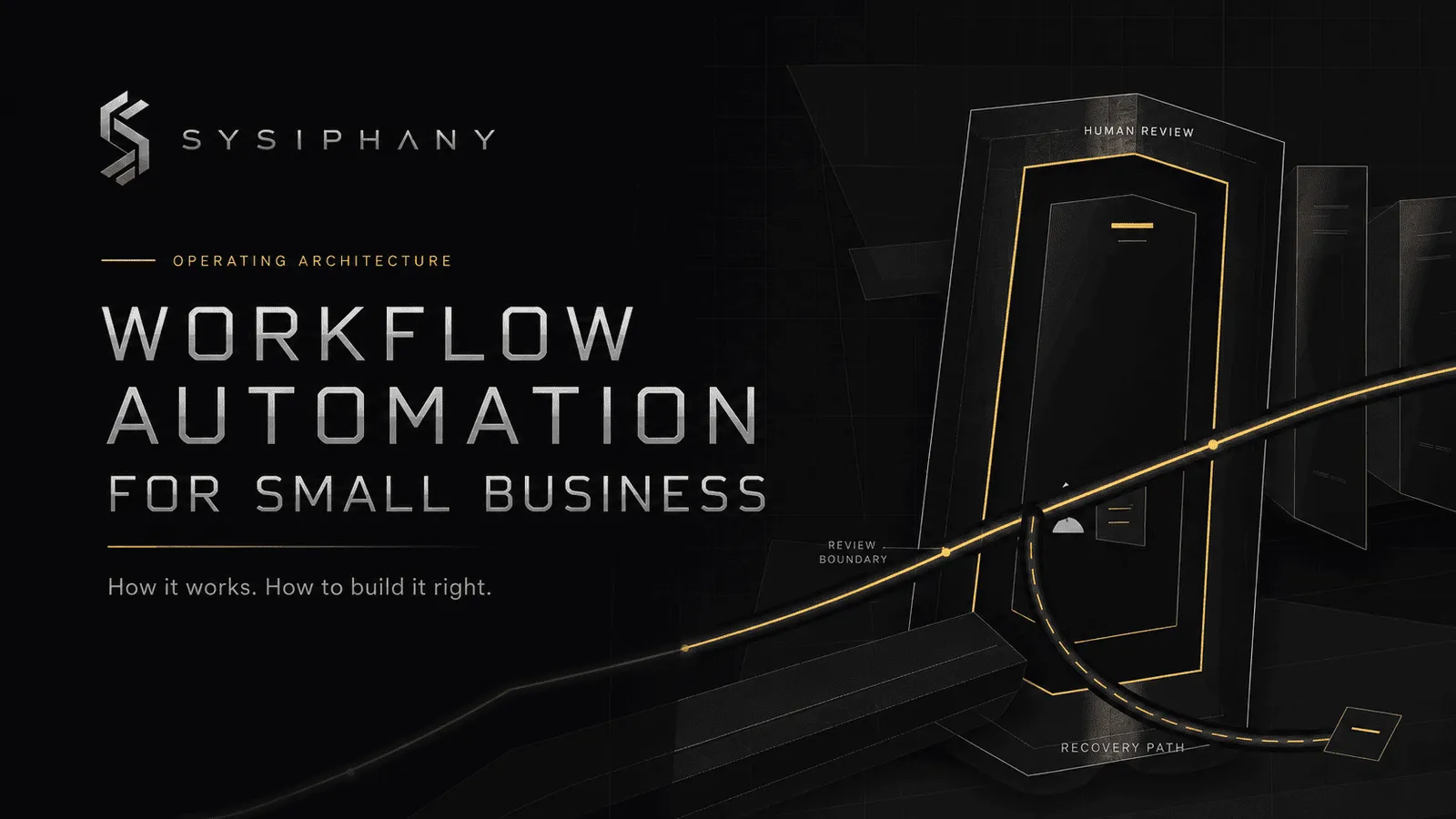
Workflow automation for small business moves recurring work through a defined operating path.
The software actions are the visible part. Reliability comes from the architecture around them: a named owner, trusted information, clear rules, deliberate handoffs, boundaries for human judgment, visible exceptions, a definition of done, monitoring, and a way to recover when something fails.
A workflow is therefore more than a row of connected apps. It is a coordinated path across people and systems that must still produce the right business result when the normal path changes.
Quick answer: What is workflow automation for small business?
Workflow automation for small business is the use of software, rules, integrations, and sometimes AI to coordinate a recurring flow of work from a defined trigger to a visible result.
A reliable automated workflow answers five practical questions:
- What starts the work, and which information can the workflow trust?
- What should happen automatically, and under which rule?
- Who owns the result as work moves between systems or people?
- Where should a person review, decide, or handle an unusual case?
- How will the team know the workflow completed or failed, and how will it recover?
This article assumes you already have a workflow worth considering. If you are choosing among candidates, use the business-process automation selection guide. If you need the full build, test, and rollout sequence, go to the step-by-step business process automation guide.
What is workflow automation?
Workflow automation uses technology to perform or coordinate steps in a recurring flow of work with less manual movement and follow-up.
A workflow connects events, information, decisions, actions, and people. It might begin when a prospect submits a form, an invoice becomes overdue, a contract is signed, a support request arrives, or a project changes status. It ends when a useful operating result exists, such as an assigned lead, an approved delivery project, a resolved request, or a reconciled record.
Automation can perform part or most of that path. It may:
- Validate required fields
- Move approved data between tools
- Apply a routing rule
- Create a task or record
- Draft or summarize information
- Pause for approval
- Notify an exception owner
- Record completion
The number of automated steps does not determine whether the workflow is sound. A five-action automation can be reliable. A fifty-action automation can quietly leave the business with duplicate records, ignored alerts, and nobody responsible for the outcome.
What workflow automation is not
Workflow automation is not simply a macro, a scheduled message, or two apps passing data. Those may be useful components, but they automate actions rather than the whole operating path.
It is also not the removal of people from work. People may initiate the workflow, supply context, approve a commitment, resolve an exception, or own recovery. Good workflow design makes those responsibilities explicit instead of pretending the software owns them.
How does workflow automation work in a small business?
Workflow automation works by detecting a defined event, reading trusted information, applying rules, performing actions, routing work to the right owner, and handling review, exceptions, completion, and recovery.
Consider a service business that receives leads through its website. The business wants qualified inquiries to reach an account manager without someone copying form details into the CRM and sending a separate message.
A reliable version could operate like this:
- Trigger: A website form is submitted.
- Trusted input: The workflow checks that the form includes contact information, requested service, location, and consent. The CRM becomes the authoritative lead record.
- Rule: A fixed rule rejects spam and routes supported service areas. An AI assistant may summarize the free-text request and suggest a category.
- Action: The system creates or updates the CRM record and attaches the original submission.
- Owner and handoff: The appropriate account manager receives an assigned CRM task with the required context, not only a notification.
- Human review: The account manager confirms qualification and approves any customer-facing response that mentions scope, price, or availability.
- Exception: Missing details, a duplicate customer, an unsupported location, or uncertain AI classification moves to a visible review queue owned by sales operations.
- Done: The lead has an owner, a recorded status, a next action, and an approved response or disposition.
- Monitoring and recovery: Failed record creation is logged and retried. If the retry fails, sales operations receives the lead and a link to the failed run so the inquiry is not lost.
The important distinction is that “form submitted, create CRM record” is only one automation. The workflow includes what the record means, who acts next, where judgment stays human, what happens to an unusual inquiry, and how the business recovers if a connection fails.
This is where handoffs and coordination loops become relevant. They are common workflow opportunities because work often slows when context passes between people or tools. They are not the definition of workflow automation, and automating a handoff without ownership simply moves the ambiguity faster.
What are the parts of an automated workflow?
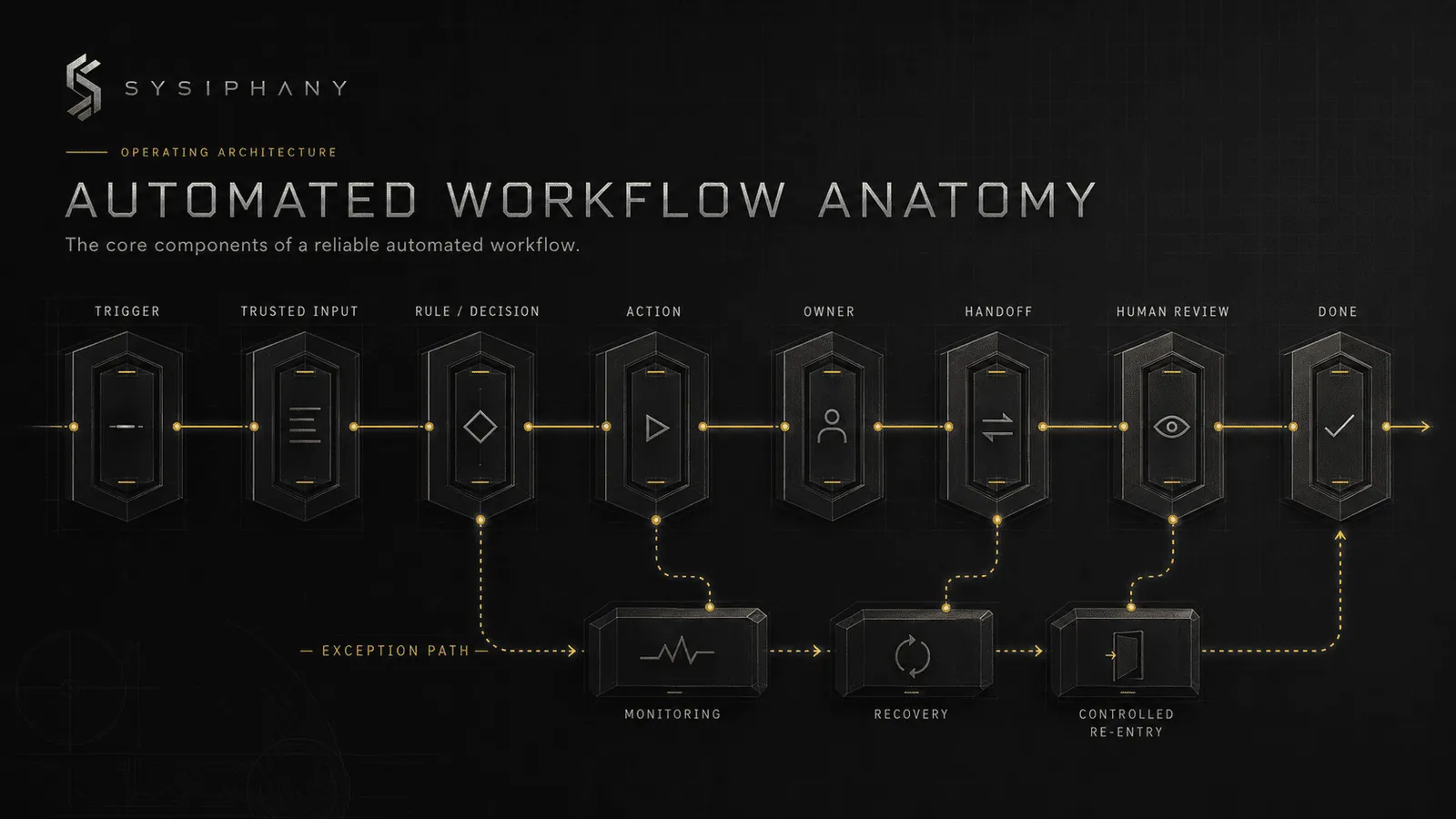
A reliable automated workflow contains a connected set of operating components, not merely chained software actions.
The central architecture is:
Trigger
  → Trusted input / source of truth
  → Rule or decision
  → Action
  → Owner
  → Handoff
  → Human review when required
  → Exception path
  → Definition of done
  → Monitoring and recovery
The sequence is a useful model, not a claim that every workflow is perfectly linear. A real workflow may branch, loop, wait, return for correction, or run actions in parallel. The components still need to be present somewhere in the design.
Trigger
The trigger is the observable event that starts the workflow. “Form submitted” is a trigger. “Customer seems ready” is a judgment that needs either a rule or a person.
Trusted input and source of truth
The workflow needs approved information to read and a defined record to update. Inputs may come from forms, documents, emails, CRM records, project systems, or accounting tools. For each important fact, the team must know which source wins when records disagree.
A technically correct integration can still propagate the wrong answer. If the CRM, spreadsheet, and inbox carry competing versions of status, settle the source-of-truth rule before connecting them more tightly.
Rule or decision
Rules determine what happens next. They may check required fields, route by service type, enforce a threshold, detect a duplicate, or decide whether review is required.
Some decisions are stable enough to express as fixed logic. Others depend on variable language or context and may use AI assistance. Consequential judgment remains with a person.
Action
An action changes the state of the work. It may create a record, update a status, move a file, prepare a draft, send an internal message, or schedule a task. Every action should serve the workflow result rather than exist because a tool can perform it.
Owner
The owner is the person or role accountable for the workflow result. Automation can execute actions. It cannot accept responsibility when a lead disappears, a customer receives the wrong commitment, or an exception sits unresolved.
Ownership includes authority to resolve problems, correct bad outputs, and decide whether the workflow should resume or stop.
Handoff
A handoff transfers work, context, or authority between people, roles, or systems. A clean handoff provides the next owner with the information and status needed to act. An alert saying “something happened” is not a handoff if nobody has responsibility for what follows.
Human review
Human review is a deliberate pause before a decision or action that needs judgment. It belongs where the workflow creates a customer promise, changes money or scope, acts on uncertain information, or encounters a sensitive case.
Review should have a clear question. “Approve this proposed response against the signed scope” is useful. “Check the automation” leaves the reviewer to rediscover the standard every time.
Exception path
An exception is any case the normal path cannot handle safely. Missing information, conflicting records, unsupported requests, low-confidence AI output, permission failures, and unusual customer commitments all qualify.
The path needs a detection condition, a pause, an owner, and a resolution state. An exception queue that nobody checks is simply a hidden failure.
Definition of done
Done is the visible business state that closes the workflow. It is not “the automation ran.” For the lead example, done means an owner, status, next action, and approved response or disposition are recorded in the CRM.
The International Organization for Standardization (ISO) process approach guide describes processes through inputs, intended outputs, sequence and interaction, ownership, controls, monitoring, and corrective action. A small business does not need to adopt an ISO quality-management system to use that operating logic. It does need to define the intended result.
Monitoring and recovery
Monitoring reveals whether the workflow ran, stalled, produced an exception, or failed. Recovery defines what happens next: retry, route to a person, restore a known state, reverse an action, or continue from a safe checkpoint.
These controls belong in the workflow architecture. They should not be bolted on after the first missed lead or duplicate invoice.
What is the difference between task automation and workflow automation?
Task automation performs one repeatable action. Workflow automation coordinates a connected operating path across actions, information, rules, people, and systems.
| Task automation | Workflow automation |
|---|---|
| Sends a reminder | Detects an overdue item, confirms status, assigns follow-up, escalates an exception, and records resolution |
| Creates a CRM record | Validates intake, creates the record, assigns an owner, pauses for review when needed, and confirms the next action |
| Summarizes a call | Produces a draft summary, routes it for confirmation, stores approved decisions, and creates owned follow-up work |
| Moves a file | Checks approval, moves the correct version, updates status, and alerts an owner if the transfer fails |
Task automation can save a click or remove copy-paste work. Workflow automation is concerned with whether the work reaches a dependable conclusion.
A workflow may contain several task automations. It may also contain manual steps, waiting states, AI-supported interpretation, and human approvals. The connective logic is what makes it a workflow.
How is workflow automation different from business process automation?
Workflow automation usually refers to coordinating the steps and handoffs within a defined flow of work, while business process automation often refers to automating a broader end-to-end business process.
The terms overlap, and vendors do not use them consistently. A small business does not need a rigid taxonomy. A useful working distinction is scope:
- Task automation handles one action.
- Workflow automation connects the operating path around a recurring item of work.
- Business process automation may coordinate several workflows, functions, policies, and systems toward a broader business outcome.
For example, routing and qualifying a lead can be one automated workflow. The wider lead-to-customer process may include marketing attribution, sales qualification, proposals, contracting, invoicing, and delivery setup. That broader process can contain several workflows with different owners and controls.
Where do deterministic automation, AI, and humans fit?
Deterministic automation, AI, and people are participants inside one workflow architecture. Each should handle the kind of work it can perform reliably.
Deterministic automation handles stable rules
Use fixed automation when the condition and response can be stated clearly. It is well suited to required-field checks, known routing logic, record updates, reminders, task creation, status changes, and moving approved data.
If service type equals Advisory, assign the advisory queue. If a required contract is missing, stop and request it. The same input should lead to the same defined result.
AI assists with variable interpretation
AI is useful when the workflow must interpret unstructured material such as emails, call notes, documents, or free-text requests. It can summarize, classify, extract, compare, draft, or recommend.
Its output should have a defined role in the workflow. A lead summary can become prepared context. A category can become a routing suggestion. A draft can wait for approval. AI should not quietly gain authority to make customer commitments because it can generate plausible language.
For more on that boundary, read AI Automation for Small Business: What to Automate First. This article’s concern is architectural: once AI participates, the workflow must state what AI may produce, what confidence or conditions trigger review, and who owns the consequence.
Humans own judgment, commitment, and unusual cases
People stay involved where trust, accountability, context, or consequence matters. They approve pricing or scope changes, handle sensitive complaints, resolve conflicting facts, interpret unusual requests, and decide when the workflow can safely resume.
A person should also own the exception path. “Send to human review” is incomplete unless the workflow names the role, gives that person the necessary context, and defines the resolution they must record.
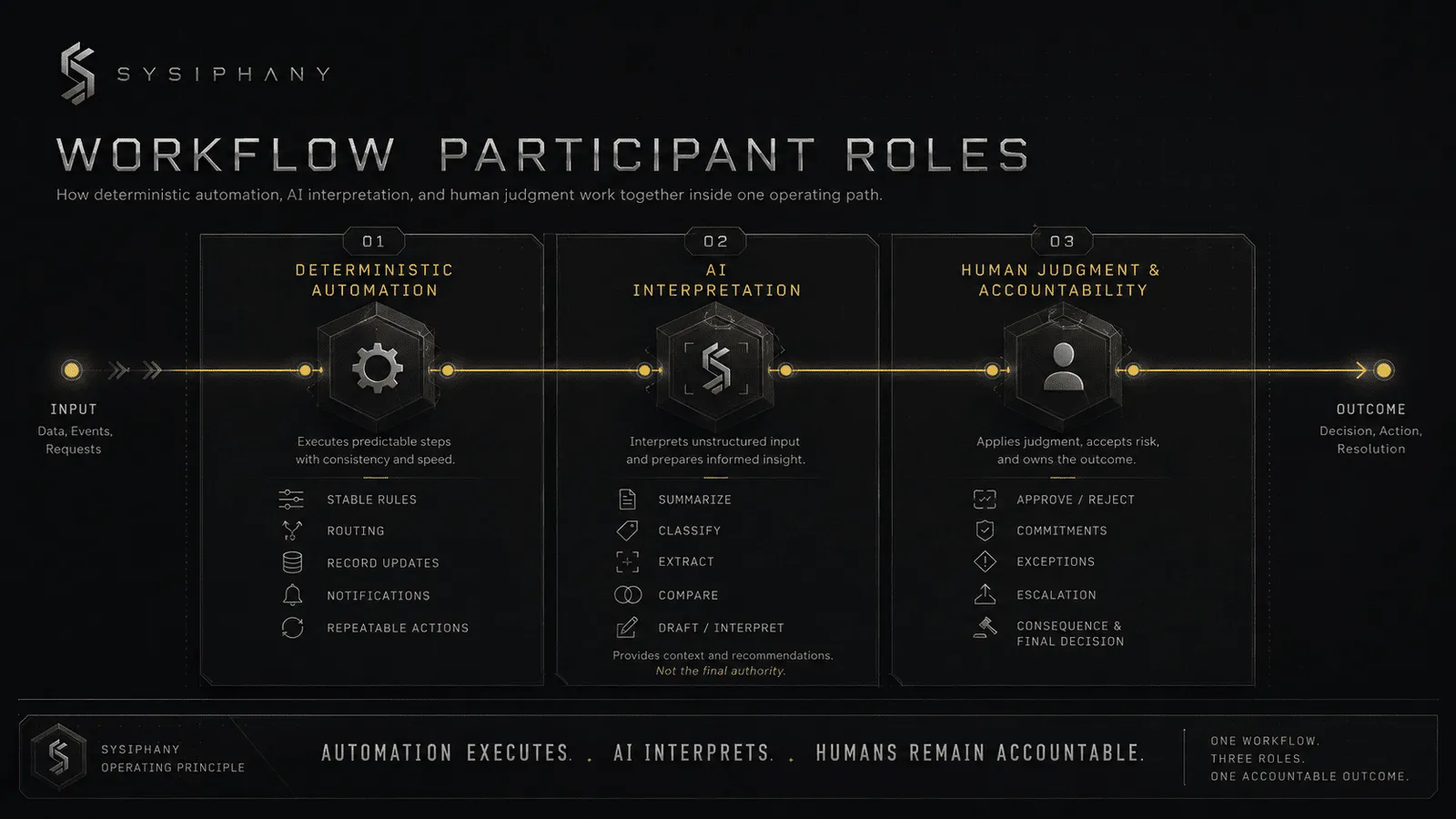
The cleanest design may use all three. AI interprets the messy request. Fixed rules move the work. A person makes the commitment. The workflow records the result.
Why do workflow automations fail?
Workflow automations fail when the software path works but the operating architecture around it is incomplete.
Here are the failure patterns that matter most.
The process is unclear
The automation encodes an assumed path while people perform several different versions. It then treats normal variation as error or silently forces work into the wrong route.
There is no authoritative source
The workflow reads one system while the team acts from another. Both records update successfully, but nobody knows which state is current.
An alert is mistaken for ownership
The automation sends a message and considers the step complete. The recipient sees information, but no task, deadline, authority, or completion state exists.
The exception path is missing
The normal case runs well. Missing data, duplicates, unsupported requests, access errors, or unusual commitments either fail silently or continue with a bad assumption.
Founder judgment remains hidden
The founder knows when to bend a rule, which client needs special handling, or what the team may promise. The workflow contains no visible threshold, example, or escalation condition, so routine exceptions return to the founder or get handled inconsistently.
AI is allowed to make commitments
A drafting or classification capability quietly becomes permission to send, approve, price, promise, or close. The system’s language is fluent, but the authority boundary is absent.
Unnecessary steps survive
The workflow automates duplicate entry, redundant approvals, unused reports, or status updates that should have been removed. More actions create more places to fail without improving the result.
Competing truths are synchronized
An integration copies conflicting information faster instead of deciding which system owns each fact. The automation increases consistency of movement, not accuracy of meaning.
There is no recovery mechanism
The workflow logs a failure but cannot retry, assign recovery, reverse an action, or resume safely. Someone eventually rebuilds the missing work by hand, often after the customer notices.
Microsoft Learn’s Power Automate guidance on robust error handling provides a concrete platform example: define alternative paths after failure or timeout, log the run, notify an owner, use controlled retries for temporary faults, and stop the flow when continued action would be unsafe. The buttons differ by tool. The architectural need does not.
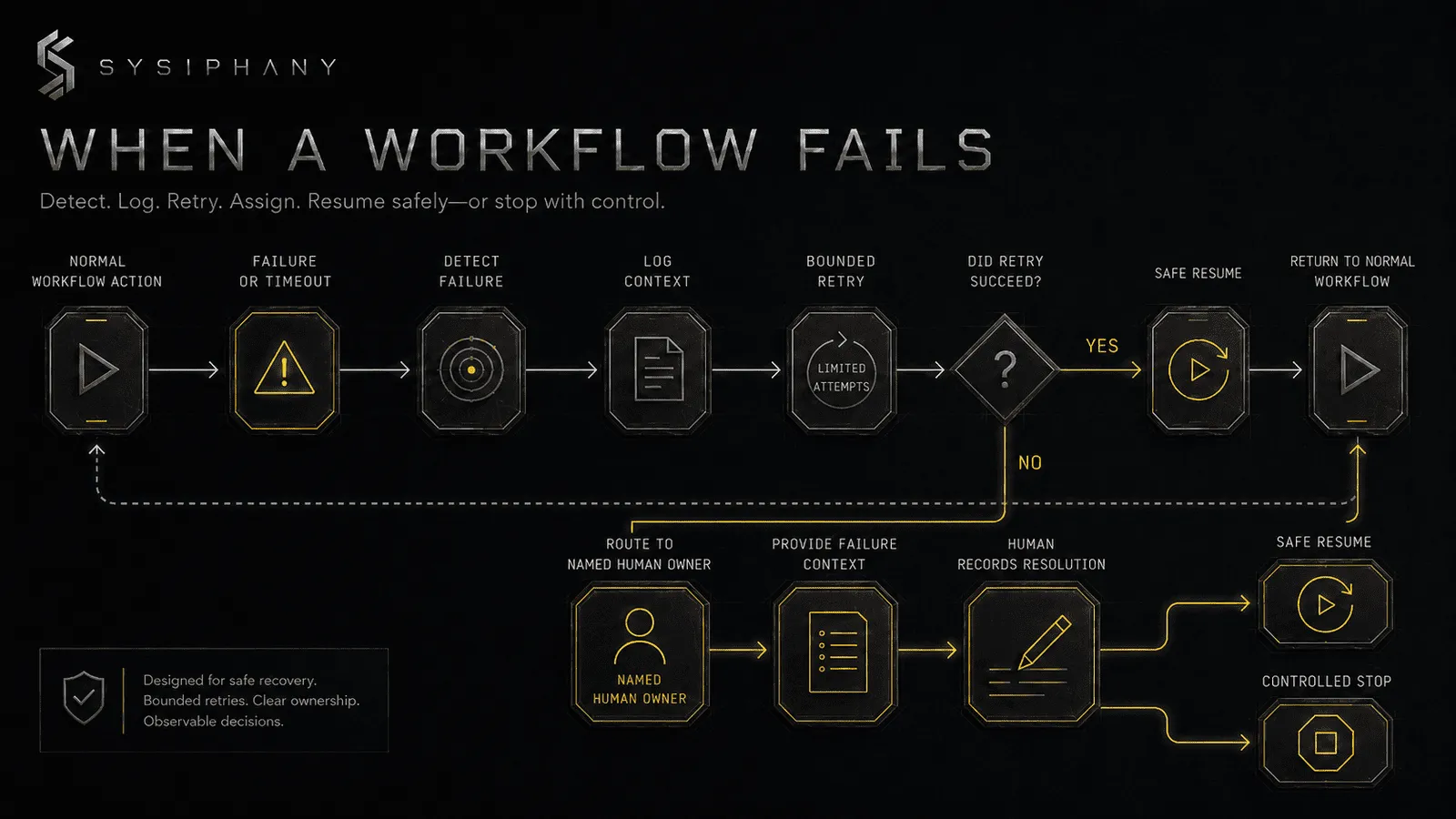
If several of these failure patterns appear across functions, the issue is larger than one automation. An operational audit can clarify ownership, truth sources, and cross-functional dependencies before more workflows are connected.
A practical diagnostic before the build
The Operational Drag Diagnosis Kit helps founder-led teams inspect repeated questions, handoff breakdowns, founder reactivity, tool sprawl, and workflow fractures. It is useful when the visible automation problem may actually be a source-of-truth or ownership problem.
Download the Operational Drag Diagnosis Kit
How should a small business start with workflow automation?
Start with one selected workflow and define its operating architecture before choosing how every step will be built.
Keep the first pass short:
- Pick one workflow. If selection is still open, use the candidate guide.
- Observe enough real work to confirm how the path operates, including common exceptions.
- Remove steps that do not protect risk or contribute to completion.
- Define the trigger, trusted input, rules, actions, owner, handoffs, review boundary, exceptions, done state, monitoring, and recovery.
- Assign deterministic automation, AI assistance, and people to the right roles.
- Pilot and measure the operating result, not merely whether actions fired.
That is the summary, not the full implementation method. For scope, testing, failure cases, measurement, and expansion, follow How to Automate a Business Process.
Reliable workflow automation can create operating capacity without immediately adding headcount, but only when it removes coordination rather than shifting it to another person.
FAQ
What is workflow automation in simple terms?
Workflow automation uses software to move recurring work through a defined path. It can start actions, check information, apply rules, route work, request human approval, record completion, and surface failures.
What is the difference between task automation and workflow automation?
Task automation performs one action, such as sending a reminder or creating a record. Workflow automation connects multiple actions, decisions, owners, systems, handoffs, exceptions, and completion states around one flow of work.
What is the difference between workflow automation and business process automation?
Workflow automation usually focuses on a defined flow of work. Business process automation may cover a broader end-to-end process containing several workflows, functions, and systems. The terms overlap, so scope matters more than a rigid label.
Can workflow automation connect multiple tools?
Yes. An automated workflow can read from one tool, apply logic, update another, create work in a third, and record completion in the authoritative system. The design still needs a source-of-truth rule, ownership, and a recovery path when a connection fails.
Does workflow automation require AI?
No. Many reliable workflows use deterministic rules and integrations without AI. AI becomes useful when the workflow must interpret variable language, documents, messages, or other unstructured inputs.
Where should humans stay involved in workflow automation?
Humans should stay involved where the workflow needs judgment, creates a commitment, affects trust or consequence, handles uncertain information, or leaves the normal path. A person should also own unresolved exceptions and recovery.
What should happen when an automated workflow hits an exception?
The workflow should detect the condition, pause any unsafe action, route the case with context to a named owner, record the resolution, and either resume from a safe point or stop in a known state.
Why can workflow automation fail even when the software works?
The software can execute every configured action while the work still fails because information is untrusted, ownership is missing, alerts are ignored, AI crosses an authority boundary, exceptions stay hidden, completion is vague, or nobody can recover a failed run.
Build the operating path, not just the automation
Workflow automation for small business works when the full path is reliable across people and systems.
The trigger has to be real. The information has to be trusted. Rules need boundaries. Actions need owners. Handoffs need context. Human review belongs where judgment and consequence begin. Exceptions need a visible route. Done must describe a business result. Monitoring must lead to recovery.
A workflow that contains those elements can absorb more automation over time. One that does not will keep returning work to the team in the form of chasing, correction, and founder intervention.
When a workflow crosses several teams or systems, contains consequential decisions, depends on undocumented founder judgment, or has conflicting sources of truth, architecture deserves more attention before implementation.
Book a SYSIPHANY discovery call to bring one real workflow into review. We can identify the ownership, truth, decision, exception, and recovery boundaries that need to be clear before the automation is built.