A messy tech stack does not always look messy. Sometimes it looks responsible.
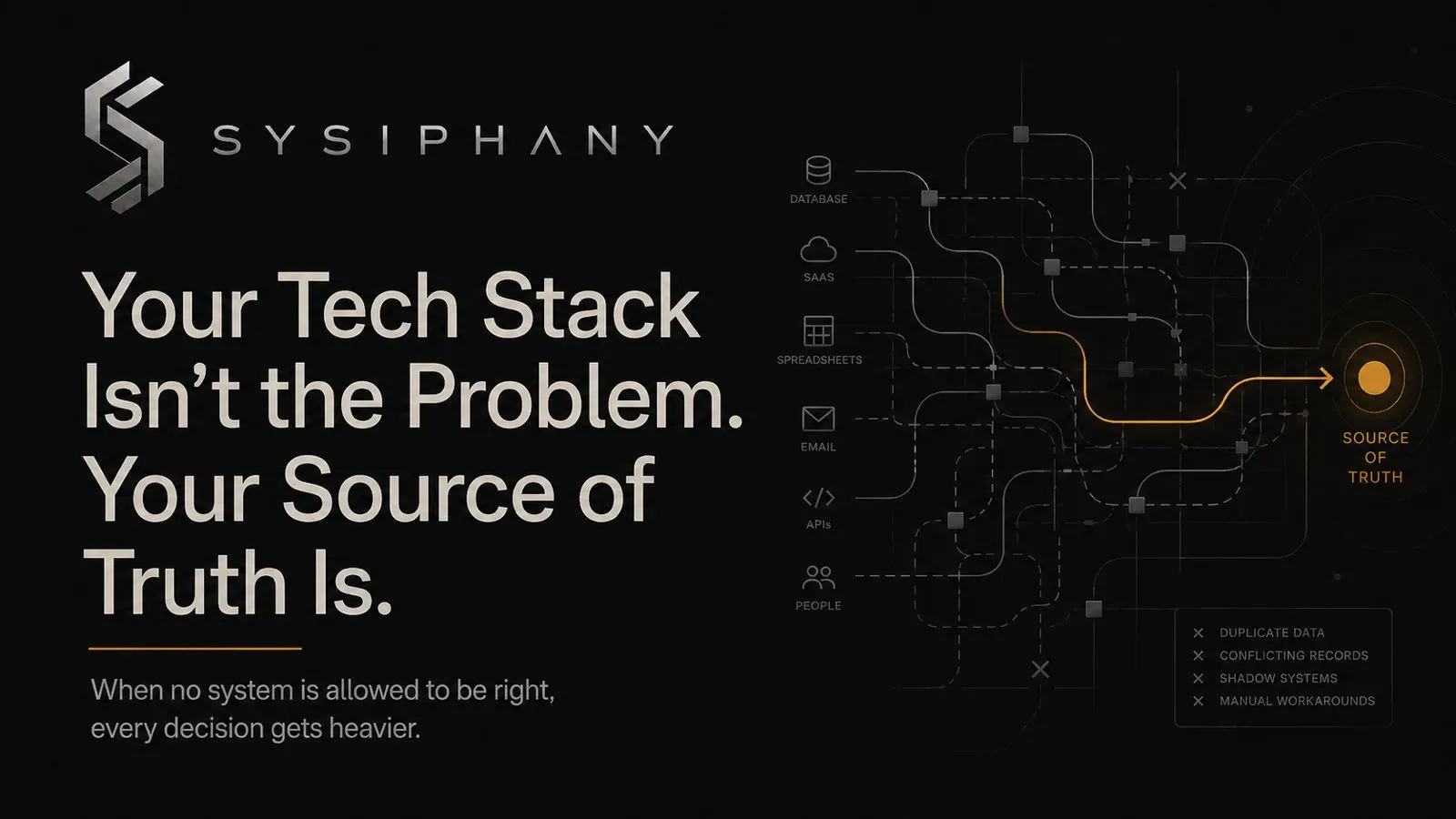
There is a CRM. A project board. A finance system. A shared drive. A reporting dashboard. A few spreadsheets that “only exist for backup.” Maybe an automation tool someone set up six months ago. Maybe an AI tool the team tried because it seemed harmless.
Nothing looks obviously broken, which is why the problem is hard to name.
The pain does not come from one bad platform. It comes from the business no longer knowing which system is allowed to be right.
A client status lives in the CRM. Delivery has the latest version in the project board. Finance has its own invoice tracker. Slack has the real context. The founder remembers the exception.
The business has tools. What it does not have is a trusted version of reality.
That is where a tech stack starts causing operational drag.
Quick answer
A tech stack causes operational drag when a team has tools for storing information but no clear source of truth for making decisions.
For the broader operating-system view, read Operational Drag Is the Hidden Cost of Scaling.
What is source-of-truth confusion?
Source-of-truth confusion happens when a team does not know which system is allowed to be trusted for a specific decision.
It is the quiet failure underneath many tool-stack problems: the business has places to store information, but no clear authority for action.
What is software sprawl?
Software sprawl is the buildup of overlapping tools, duplicate systems, and unofficial workarounds that make it harder for a team to know where work, data, or decisions should live.
Why does software sprawl create operational drag?
Software sprawl creates operational drag by forcing people to reconcile information, ownership, and status across systems that were never clearly assigned authority.
The real cost of software sprawl is doubt.
Software sprawl is easy to underestimate because each tool usually had a good reason to exist.
A team needed better lead tracking.
A project manager needed visibility.
Finance needed clean records.
Someone needed a faster way to send updates.
Someone else needed a spreadsheet because the official system did not quite work.
That is how most stacks grow: not because anyone was careless, but because small, reasonable decisions were made under pressure.
But every new tool creates a question the business has to answer:
What truth does this system own?
If that question is not answered, the tool becomes one more place where reality can split.
The result is not just tech stack inefficiency. It is doubt.
The team pauses before acting. They check another system, then another, then ask the person who usually knows. Work still gets done, but it moves through unnecessary confirmation loops.
That is the part leaders often miss.
The cost is not only the subscription.
The cost is the hesitation.
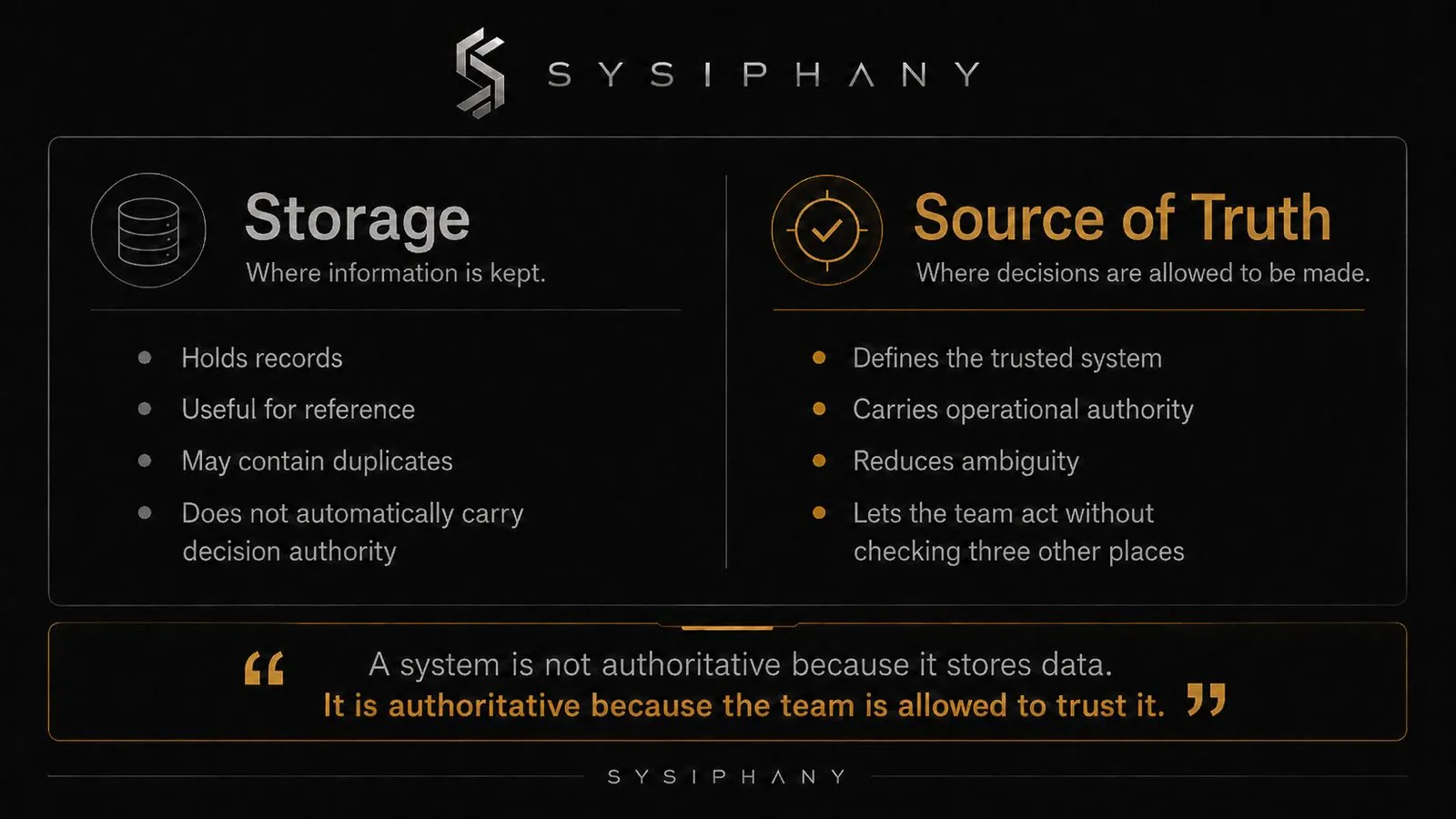
A source of truth is not just where data lives
Most teams use “source of truth” too loosely.
They treat it like a storage question.
Where does the client record live?
Where do we keep project files?
Where do we track invoices?
Where do we document the process?
Those questions matter, but they are not enough.
A real source of truth answers a sharper question:
Which system is the team allowed to trust when making a decision?
That distinction changes the conversation.
A CRM may store client information, but is it the trusted source for client status?
A project board may show tasks, but is it the trusted source for delivery progress?
A shared drive may hold files, but is it the trusted source for final approved documents?
A dashboard may show numbers, but is it the trusted source for performance decisions?
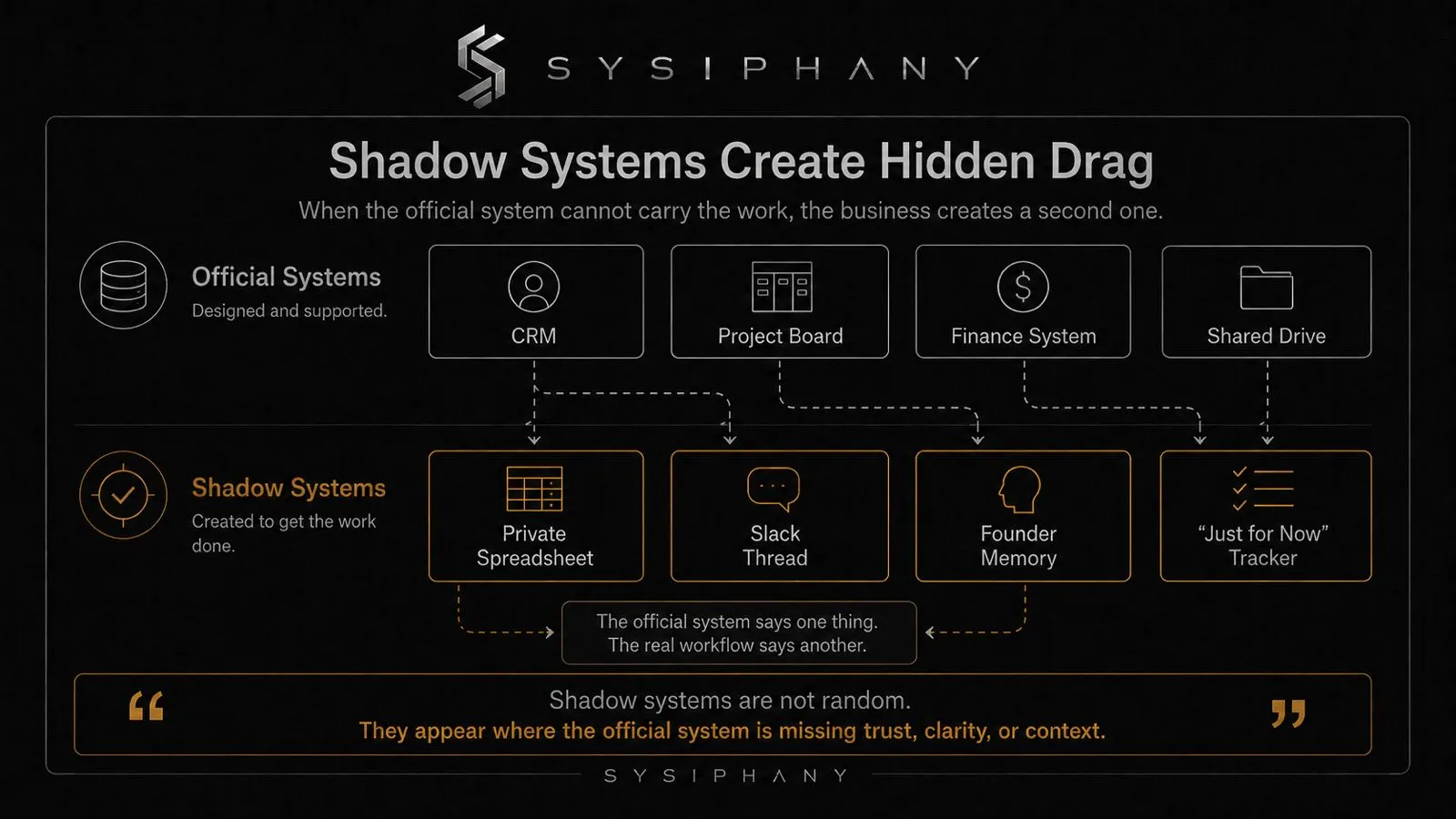
If the team does not know, people will quietly create their own truth layer.
That is where shadow systems appear.
What are shadow systems?
Shadow systems are unofficial tools, spreadsheets, notes, or workarounds employees use when the official system does not carry enough trust, context, or usability.
A shadow system might be a private checklist, a Slack thread, a folder structure only one person understands, or someone’s memory.
Shadow systems are not always bad. Sometimes they reveal what the official system is missing.
But they become expensive when the company starts relying on them without admitting they exist.
That is when you get two businesses running at once.
The official business lives in the approved tools.
The real business lives in the workarounds.
Founders feel this before they can name it. They know the team has platforms. They know the tools are being used. But they also know the business still depends on certain people remembering what the system forgot to capture.
That is not a training issue. It is an architecture issue.
The tool may be fine. The operating role may be unclear.
One of the fastest ways to waste money is to blame a tool for a role the business never clearly assigned.
A CRM is not failing because delivery does not know what sales promised if nobody defined what information must pass from sales to delivery.
A project board is not failing because tasks are vague if nobody defined ownership and completion standards.
A dashboard is not failing because people ignore it if the numbers do not connect to decisions the team actually makes.
The tool can only support the role it has been given.
Many tech stack problems are really role-definition problems.
The business bought the tool, but never assigned the tool a job.
So the tool becomes a container. People put things in it. Other people look somewhere else. Then leadership wonders why the stack feels bloated.
A tool without a clear operational role becomes shelf space. Digital shelf space is still clutter.
What is a tech stack audit?
A tech stack audit is a review of each operational tool, the truth it owns, how it is updated, where it creates duplication, and whether it should be kept, simplified, connected, removed, or migrated.
Before replacing a platform, run a simple weight test.
The point is not to shame the tool.
The point is to decide whether it is making the business lighter or heavier.
For each major tool, ask these questions.
1. What decision does this tool support?
A tool should help the team decide, act, track, deliver, approve, or remember something important.
If nobody can explain the decision it supports, the tool may not be carrying real operational weight.
It may just be where information goes to sit.
2. What truth does this tool own?
Be specific.
Not “client information.”
That is too broad.
Better:
- CRM owns lead stage.
- Project board owns delivery status.
- Finance system owns invoice status.
- Shared drive owns final approved documents.
- Knowledge base owns current internal process.
The exact assignments will vary by business.
The important part is that the assignment exists.
3. Who updates it, and when?
A system that depends on vague updating habits will drift.
Someone has to own the update. The trigger has to be clear. The timing has to make sense inside the workflow.
If updates happen “when someone remembers,” the tool is not a source of truth. It is a suggestion.
4. Where does this tool duplicate another tool?
Duplication is not automatically wrong.
But ungoverned duplication creates doubt.
If the same status, file, deadline, or client note lives in multiple places, the team needs to know which version has authority.
If nobody knows, every duplicate field becomes a future clarification loop.
5. What workaround exists around this tool?
This is the honest question.
Where does the team avoid the tool?
Where do they maintain a side tracker?
Where do they screenshot instead of update?
Where do they ask in Slack because the system does not feel safe to trust?
Workarounds are not failures.
They are evidence.
They show where the stack does not match the work.
6. What would break if we removed it?
This question cuts through attachment.
If removing the tool would break a critical workflow, the tool matters.
If removing it would mostly create anxiety, the business may be keeping it for emotional reasons, historical reasons, or “we already pay for it” reasons.
That is not strategy. It is residue.
Do not migrate a mess
A platform migration can be the right move.
It can also become a very polished way to preserve the same confusion.
The new system looks clean at first. Everyone attends training. The dashboards are fresh. The project boards are neatly organized. There is a brief moment where the business feels lighter because the interface is unfamiliar enough to create discipline.
Then the real work returns.
A client changes scope.
A status does not fit the dropdown.
A deadline moves.
A handoff lacks context.
Someone creates a spreadsheet “just for now.”
The mess was not in the old platform. It was in the operating logic underneath it.
This is why a business systems audit should come before a major tech stack change. Not because audits are exciting. They are not. But they prevent the company from migrating confusion into a more expensive container.
If the source-of-truth model is unclear, fix that first.
Then decide whether the platform needs to change.
How do you decide whether to keep, simplify, connect, remove, or migrate a tool?
You decide whether to keep, simplify, connect, remove, or migrate a tool by comparing the tool’s operational role, source-of-truth value, duplication cost, manual workarounds, and team trust.
A tech stack audit should not end with a vague recommendation.
It should end with decisions.
For each tool, there are usually five options.
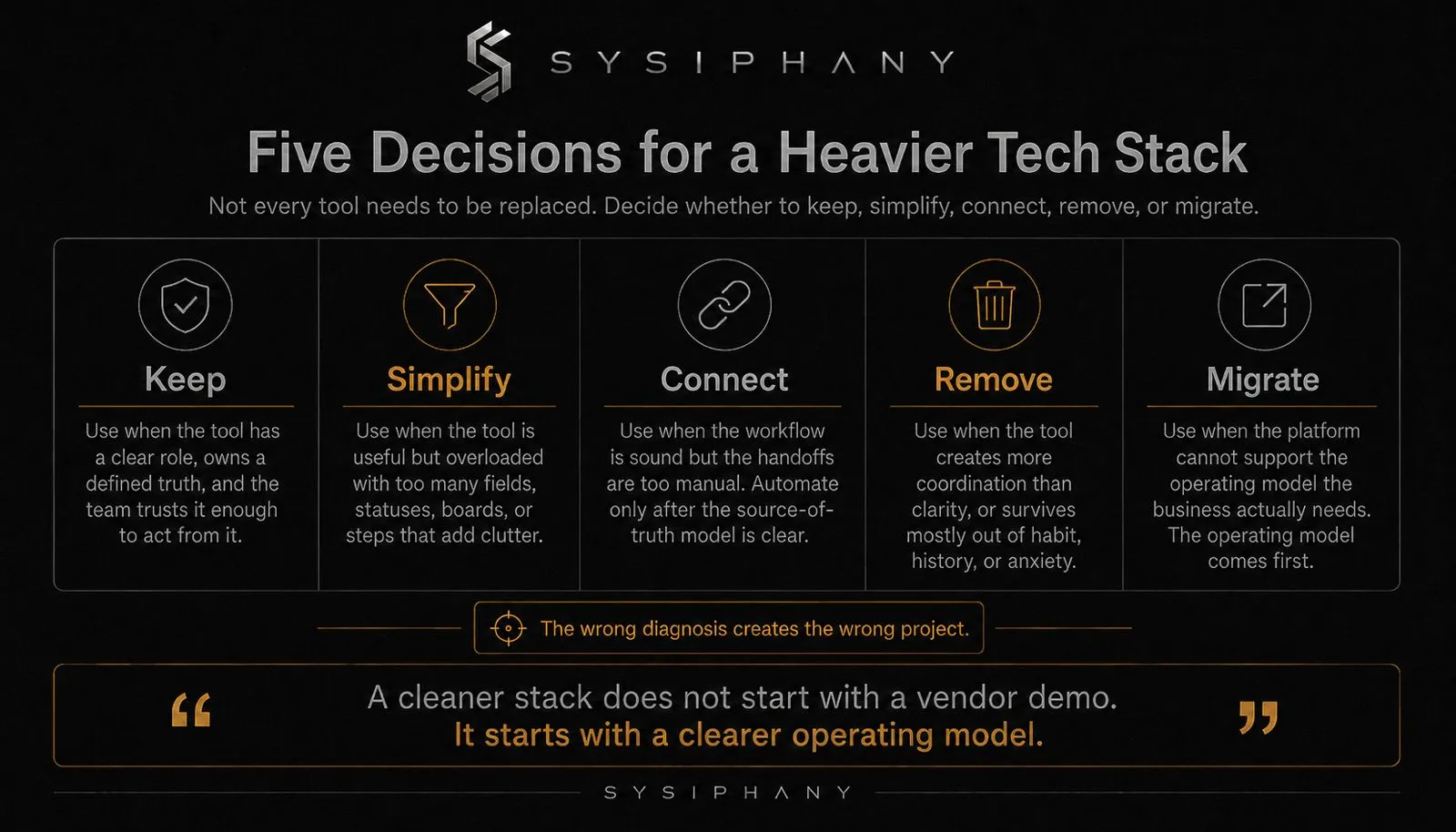
Keep
Keep the tool if it has a clear role, supports real work, owns a defined truth, and the team trusts it enough to act from it.
No drama needed.
Not every tool has to be consolidated.
Simplify
Simplify the tool if it is useful but overloaded.
Too many fields. Too many statuses. Too many boards. Too many automations. Too many required steps that exist because someone once thought they might matter.
Complexity accumulates quietly.
Simplification is maintenance.
Connect
Connect the tool if the workflow is sound but the handoffs are too manual.
This is where automation can help, but only after the source-of-truth model is clear.
Do not automate confusion. It gets faster.
Remove
Remove the tool if it creates more coordination than clarity.
Some tools remain in the stack because nobody wants to be the person who questions them.
Question them.
A tool that no longer earns its place is not neutral. It adds weight.
Migrate
Migrate only when the existing platform cannot support the operating model the business actually needs.
That is the key: the operating model comes first, and the platform follows.
What a clean tech stack feels like
A clean tech stack is not necessarily small.
It is legible.
The team knows where to look. They know which system owns which truth. They know who updates what and when. They know which exceptions require escalation. They know when a spreadsheet is intentional and when it is a symptom.
The founder is not the router of routine ambiguity. That is the test.
If normal work still requires people to reconcile systems by hand, the stack is not clean yet.
If people need meetings to explain what the tools should already show, the stack is not clean yet.
If the team keeps private trackers because the official system is not trusted, the stack is not clean yet.
Clean does not mean perfect. It means the tools reduce doubt.
Where AI fits
AI does not need to be the villain in this conversation.
It just needs to stay in its lane.
AI can help summarize, route, draft, classify, extract, and accelerate work inside a clear system.
But if the source of truth is unclear, AI has no stable ground to stand on. If ownership is unclear, AI does not know who should act. If the workflow is fragmented, AI becomes another layer people have to manage.
That is why AI readiness is not mainly a model question.
It is an operations question.
Can the business clearly define the workflow?
Can the team trust the data?
Can the system tell AI what “good” looks like?
Can humans review the right exceptions without becoming the bottleneck?
If not, start lower.
Fix the stack logic first.
What should you do before replacing your tech stack?
Before replacing your tech stack, map which tools own which truth, where information is duplicated, where workarounds exist, and which systems the team actually trusts.
If your tech stack feels heavy, resist the urge to start with vendor demos.
Start with a map.
List the tools. Identify what each one owns. Mark where the same information appears in more than one place. Find the spreadsheets nobody talks about. Ask where the team actually looks before making decisions.
Then look for the pattern.
You may not need a new platform.
You may need one source of truth for client status.
You may need fewer fields.
You may need a cleaner handoff from sales to delivery.
You may need to remove the spreadsheet that survived three system changes.
You may need to define who owns the update nobody wants to own.
These fixes are not glamorous.
Good. Glamour is rarely what operations needed.
Download the Operational Drag Diagnostic Kit
The Operational Drag Diagnostic Kit helps founder-led teams identify where work is getting stuck before adding another tool, automation, AI system, or hire.
Use it to inspect:
- Disconnected systems
- Manual coordination
- Duplicated work
- Unclear ownership
- Workflow fragmentation
- Founder dependency
- AI readiness risk
If your tools are creating more doubt than clarity, start with the diagnosis.
Download the Operational Drag Diagnostic Kit.
FAQ
How do I know if my tech stack is causing operational drag?
Your tech stack may be causing operational drag if people check multiple systems before acting, maintain unofficial spreadsheets, manually update the same information in several places, or ask the founder to resolve routine ambiguity.
What is source-of-truth confusion?
Source-of-truth confusion happens when the team does not know which system is allowed to be trusted for a specific decision. It often leads to duplicate work, manual checking, side spreadsheets, and unnecessary escalation.
What are shadow systems?
Shadow systems are unofficial tools or workarounds the team uses because the official system does not fully support the real workflow. Examples include private spreadsheets, Slack threads, personal notes, and manual trackers.
Should we replace our CRM or project management tool?
Not before diagnosing the operating model. If the real issue is unclear ownership, weak handoffs, or source-of-truth confusion, replacing the platform may simply move the same problem into a new interface.
What should a tech stack audit include?
A useful tech stack audit should identify what each tool does, what truth each tool owns, who updates it, where duplication exists, what workarounds surround it, and whether the tool should be kept, simplified, connected, removed, or replaced.
Can AI help clean up a messy tech stack?
AI can help inside a clear system. It can summarize, classify, route, and extract information. But if the source of truth is unclear or the workflow is fragmented, AI usually adds another layer of complexity.