
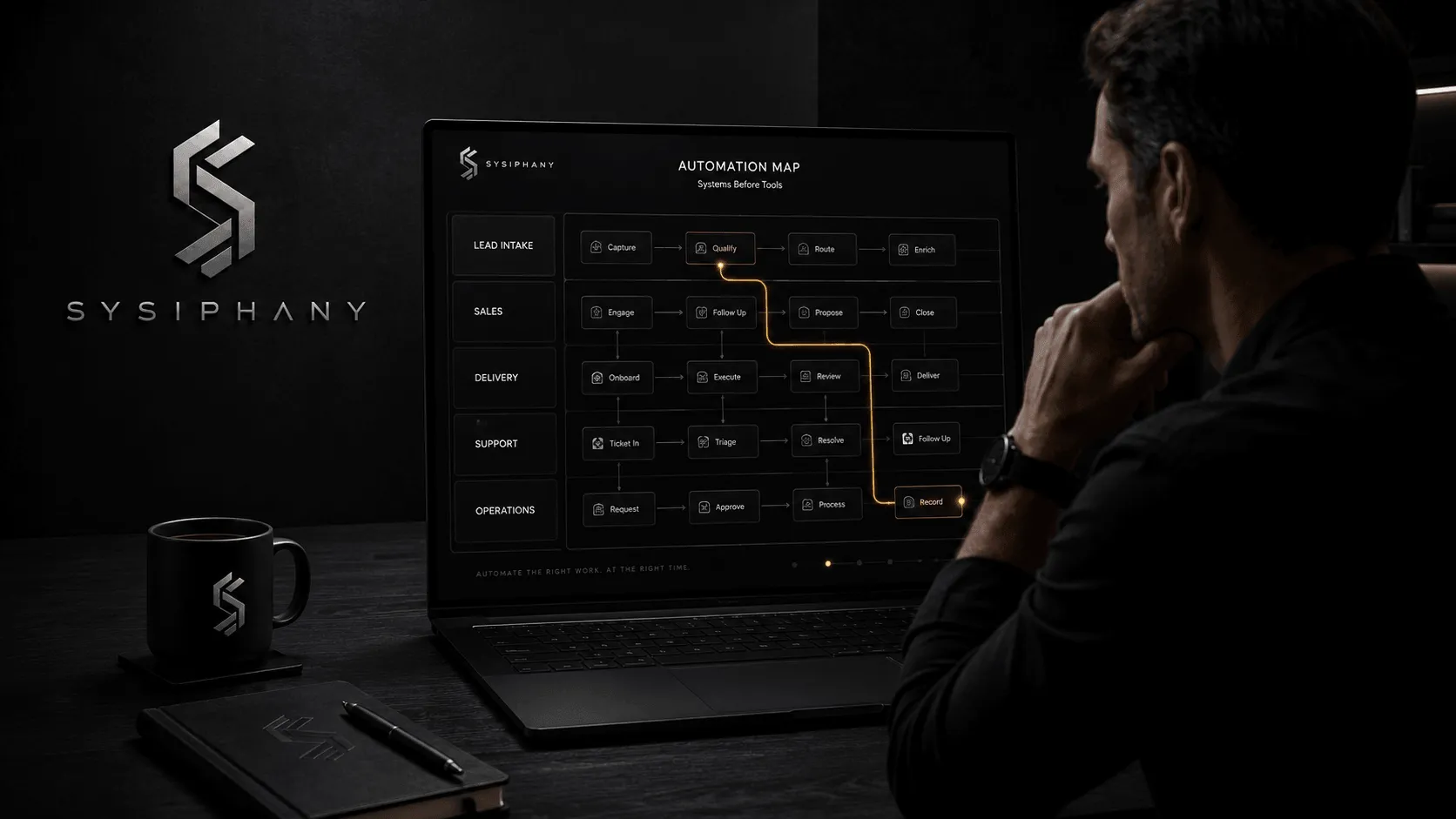
AI automation for small business works best when you automate clear, repeatable work before you automate judgment-heavy work.
Most founders do not wake up wanting an automation strategy.
They wake up tired of answering the same internal questions for the fifth time this week.
The lead comes in, but no one agrees who owns it.
The support message gets summarized, but the source of truth is split between the inbox, CRM, Slack, and someone’s spreadsheet.
The client follow-up gets drafted, but the team still needs the founder to decide what is safe to promise.
That is where AI automation starts to create friction instead of leverage.
The issue is rarely that the tool cannot do the task. The issue is that the business has not defined the workflow well enough for the tool to support it.
The first question is not “Which AI automation tool should we buy?”
The first question is:
Which part of the business is clear enough to automate without creating more rework, risk, or founder dependency?
Quick answer: what should a small business automate first?
Small businesses should automate repetitive, low-risk, clearly defined work where the trigger, owner, source of truth, output, and review point are already known.
Good early automation candidates include:
- Lead intake routing
- Meeting summaries
- Follow-up reminders
- Internal status updates
- Form-to-CRM entry
- FAQ draft responses
- Invoice or document preparation
- Task creation from approved requests
- Customer support triage
- Reporting preparation
Weak automation candidates include:
- Sensitive customer complaints
- Pricing exceptions
- Client promises
- Hiring or firing decisions
- Strategic tradeoffs
- Financial approvals
- Anything where the team still asks the founder, “What should we do here?”
AI can reduce workload. It cannot safely replace missing workflow clarity.
For a deeper foundation, read AI Implementation for Small Business: How to Build AI That Actually Works and AI Readiness Assessment: Is Your Business Actually Ready for AI?.
What is AI automation for small business?
AI automation for small business is the use of AI tools, workflows, and connected systems to reduce manual effort inside repeatable business processes.
That can include drafting emails, routing leads, summarizing meetings, updating records, preparing reports, answering common questions, or moving work between tools.
Traditional automation follows fixed rules.
AI automation can handle more flexible inputs: messy text, customer messages, call transcripts, support tickets, notes, emails, documents, and unstructured requests.
That flexibility is useful.
It is also why AI automation needs boundaries.
A rule-based automation might say:
“When this form is submitted, create a CRM record.”
An AI automation might say:
“Read this inquiry, decide what kind of lead it is, summarize the need, assign a priority, and draft the next step.”
The second workflow requires more than a tool connection.
It needs business logic.
Who owns the lead?
Which source of truth should be updated?
What counts as high priority?
When should the AI draft instead of send?
When should a human review the response?
When should the founder be pulled in?
Without those answers, AI automation becomes another layer of operational noise.
How do you know what to automate first?
You know what to automate first by looking for work that is repetitive, frequent, low-risk, clearly triggered, and easy for a human to review.
A good first automation candidate usually has six traits:
-
It happens often.
The task repeats weekly, daily, or many times per day. -
It follows a recognizable pattern.
The work does not require a new strategy every time. -
The input is clear.
The automation knows what to look at: a form, email, CRM field, ticket, meeting transcript, spreadsheet, or document. -
The output is clear.
The result is specific: a summary, draft, task, label, notification, update, or recommendation. -
The owner is clear.
Someone knows who is responsible after the automation runs. -
The review point is clear.
A human can quickly check the result before it affects a customer, financial decision, or team commitment.
If a process fails those tests, the next step is workflow cleanup.
This is the same reason an operational audit should come before AI implementation. You are not auditing for paperwork. You are finding the places where automation would either help or amplify confusion.
The AI automation candidate map
Use this simple map before choosing an AI automation tool.
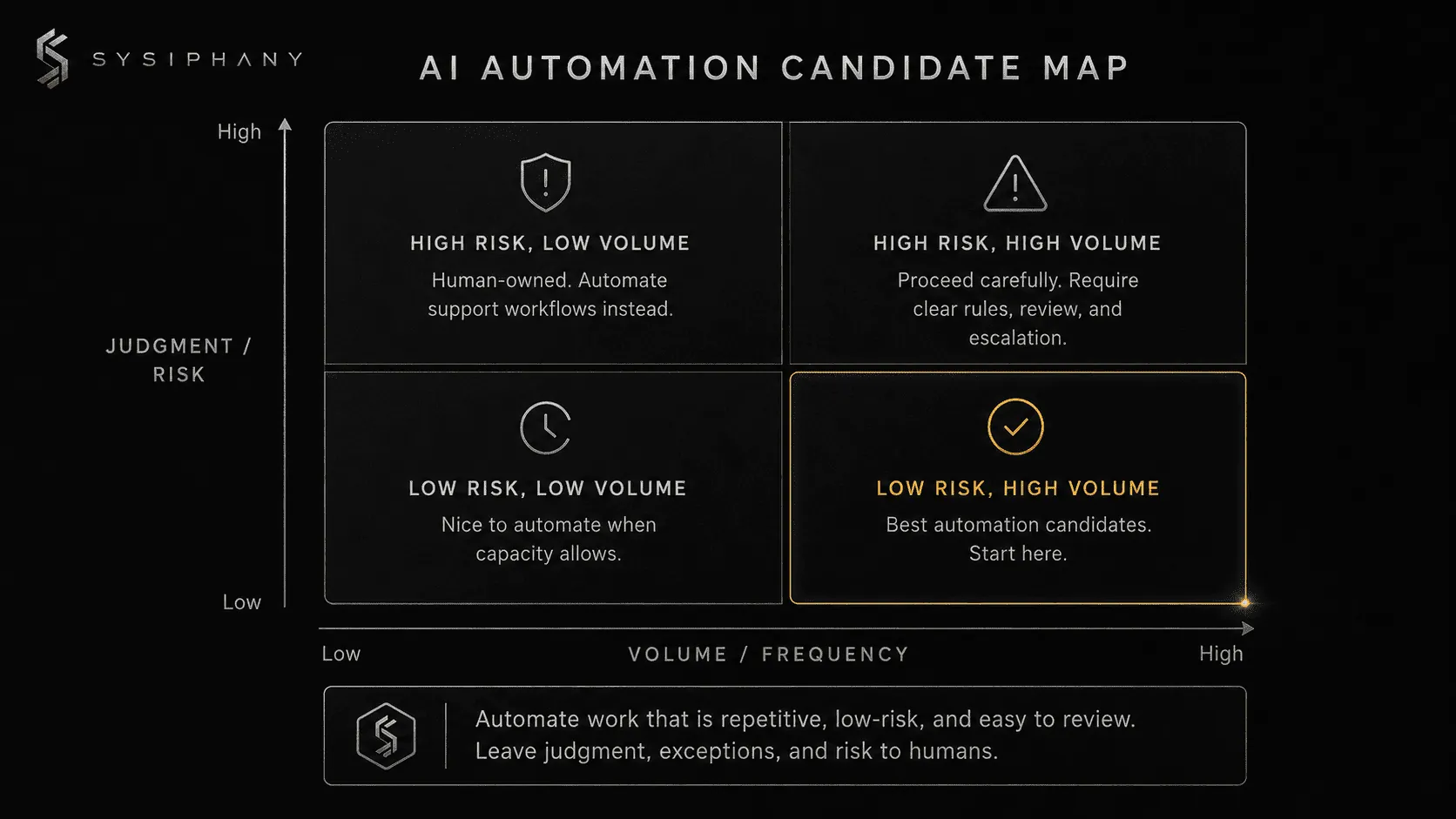
| Workflow signal | Automate now? | Why |
|---|---|---|
| The same task happens daily with clear steps | Yes | The pattern is stable enough to support automation. |
| AI can draft and a human can approve | Yes | This creates leverage without removing accountability. |
| The task is repetitive, low-risk, and easy to reverse | Yes | Early automation should have limited downside. |
| The team disagrees where the right information lives | Not yet | This is a source-of-truth problem first. |
| The founder approves every exception | Not yet | Decision rules need to be extracted before automation. |
| The workflow crosses sales, delivery, and finance with no clear handoff | Not yet | Automation will speed up the confusion. |
| The output creates a client promise, pricing decision, or refund decision | Carefully | Human review and escalation rules need to be explicit. |
| Nobody owns the result after the automation runs | Not yet | Automation should never create orphaned work. |
This is where many small businesses misread the opportunity.
They see repetitive work and assume it should be automated.
Sometimes that is true.
Other times the repetition is a symptom of a deeper issue: unclear ownership, duplicate sources of truth, weak handoffs, or founder-dependent judgment.
SYSIPHANY calls that operational drag.
Operational drag is the hidden friction that makes work slower, heavier, and more dependent on the founder than it should be.
AI automation can reduce operational drag when the workflow is clear. It can also multiply drag when the workflow is unclear.
What business processes should a small business automate first?
Small businesses should usually automate administrative, routing, summarizing, reminder, reporting, and intake work before automating customer-facing judgment or strategic decisions.
Here are the strongest early categories.
1. Lead intake and routing
Lead intake is often a strong first automation candidate because the trigger is clear.
A person fills out a form. A message comes in. A call is booked. A referral arrives.
AI can classify the inquiry, summarize the need, assign a category, create a CRM note, draft a response, and notify the right person.
But the business still needs rules.
What makes a lead qualified?
Who owns the next step?
What information is required before a sales call?
Which promises should never be made automatically?
Example:
A home services company wants AI to respond to new estimate requests.
That can work if the AI is only confirming receipt, summarizing the job, checking for missing details, and routing the lead to the right person.
It becomes risky if the AI starts estimating price, promising availability, or committing to scope before the business has clear rules.
The automation should support the intake workflow. It should not invent the sales judgment.
Related: Your Tech Stack Isn’t the Problem. Your Source of Truth Is.
2. Meeting notes and action items
Meeting summaries are one of the safest early uses of AI because the output is reviewable.
AI can summarize decisions, extract action items, identify owners, and draft follow-up messages.
The risk appears when the business treats the AI summary as truth without review.
A better workflow looks like this:
AI drafts the summary.
A human confirms the decisions.
The confirmed decisions go into the correct source of truth.
The team acts from the confirmed source, not from scattered notes.
Example:
A small agency uses AI to summarize client calls.
The useful automation is not “send the summary immediately.”
The useful automation is: draft the recap, pull out action items, flag possible scope changes, and hold the client-facing message for account manager approval.
That saves time without letting AI accidentally create a new promise.
3. Internal status updates
Many growing businesses waste time asking, “Where does this stand?”
AI can help prepare daily or weekly status summaries from CRM notes, project tasks, support tickets, or internal updates.
This is useful when the underlying source is trusted.
It is dangerous when different tools disagree.
If the CRM says one thing, the spreadsheet says another, and Slack says a third, AI cannot know which one is authoritative unless the business has already decided.
That is a source-of-truth problem before it is an automation problem.
Example:
A founder wants a weekly AI-generated operations summary.
Good idea.
But if project status lives in ClickUp, client promises live in email, delivery blockers live in Slack, and revenue status lives in a spreadsheet, the first move is not the AI summary.
The first move is deciding which system owns which category of truth.
Then AI can summarize from the right places.
4. Customer support triage
AI can help sort support messages by topic, urgency, customer type, sentiment, or required next step.
It can draft replies to common questions.
It can suggest knowledge base articles.
It can identify complaints that need escalation.
But small businesses should be careful with fully automated customer support.
A simple question can often be automated.
A frustrated customer, refund request, legal concern, delivery failure, or account-sensitive issue should usually go through human review.
Example:
An ecommerce business uses AI to classify support tickets.
Shipping status questions can receive a drafted response.
Product questions can be routed to a support rep.
Refund complaints can be flagged for human review.
That is a controlled automation. It reduces workload without handing customer trust to an unreviewed system.
5. Reporting preparation
Many founders do not need AI to “analyze the business” on day one.
They need AI to gather the scattered inputs that make reporting painful.
AI can prepare weekly summaries, pull notes into a consistent format, identify missing updates, draft KPI commentary, and flag unusual changes.
The human still owns interpretation.
The founder or operator still decides what the numbers mean and what action should follow.
That is a good division of labor.
AI prepares the view.
Humans own the judgment.
6. Repetitive admin tasks
Administrative work is often the easiest place to start.
Examples include:
- Turning emails into tasks
- Creating reminders from meeting notes
- Drafting routine follow-ups
- Labeling inbound messages
- Preparing invoice details
- Checking forms for missing fields
- Organizing submitted documents
- Updating internal records after review
These tasks are not glamorous.
That is why they are useful.
Good AI automation usually starts with boring work that creates real drag.
The boring work is usually where the founder’s time is quietly leaking.
What should a small business not automate yet?
A small business should not automate work that depends on unclear judgment, sensitive exceptions, broken handoffs, untrusted data, or founder-only context.
Do not rush to automate these areas.
Pricing exceptions
If every discount, custom quote, or pricing exception still goes through the founder, the business needs decision rules before automation.
AI can help prepare pricing information.
It should not invent margin judgment.
Customer complaints
AI can draft a response.
AI can classify urgency.
AI can suggest next steps.
But complaints often contain relationship risk, emotional context, refund exposure, or operational failure.
Humans should own the response standard and escalation path.
Client promises
Any automation that creates commitments needs tight boundaries.
Delivery dates, scope promises, custom terms, and service guarantees should not be generated loosely.
If the team does not know what is safe to promise, AI will not know either.
Hiring, firing, and people decisions
AI can support preparation, documentation, and structured review.
It should not own employment decisions.
Human judgment, policy, legal review, and leadership accountability matter here.
Founder-dependent judgment calls
If the team keeps asking the founder what to do, that is not automatically a staffing issue.
It is often a missing decision-rule issue.
The founder’s reasoning needs to be made visible through examples, thresholds, escalation rules, and “when in doubt” standards.
Only then can AI help support the workflow around that judgment.
Why does AI automation fail in small businesses?
AI automation fails in small businesses when the company automates tasks before clarifying the workflow those tasks belong to.
The visible problem is usually repetitive work.
The deeper problem is usually one of these:
- No clear source of truth
- No owner for the next step
- No defined handoff
- No escalation rule
- No review standard
- No decision threshold
- No agreement on what “done” means
- No shared understanding of what the founder would approve
This is why many automation projects feel promising in week one and frustrating by month two.
The tool technically works.
The business logic around the tool does not.
If every automation idea turns into a debate about which system is accurate, who owns the next step, or whether the founder needs to approve the output, the business does not have an automation capacity problem.
It has an operational clarity problem.
That is a frustrating answer when a founder wants relief now.
But it is also the answer that prevents the next tool from becoming one more place work gets stuck.
Read more: Operational Drag Is the Hidden Cost of Scaling
How do you prepare a workflow for AI automation?
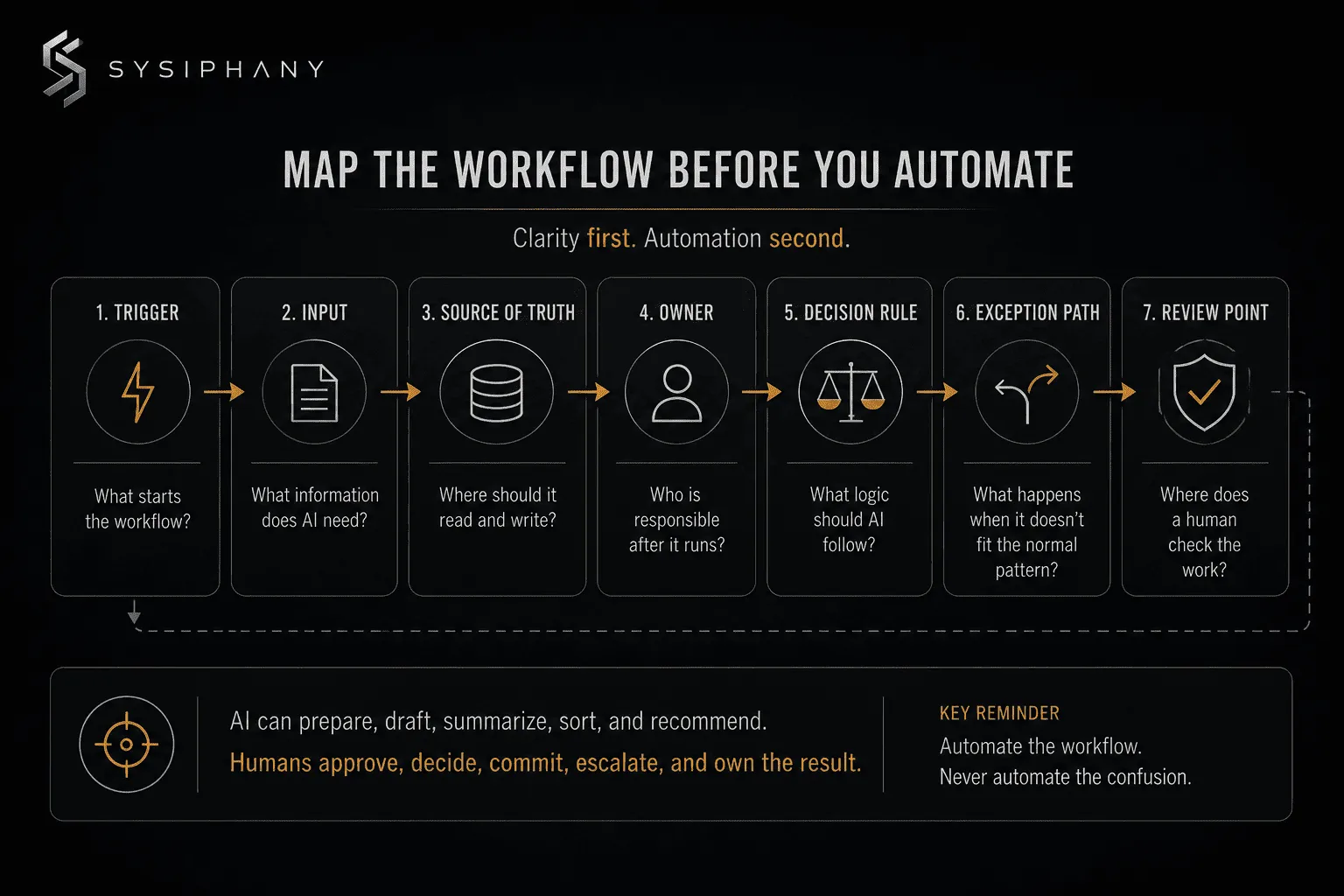
You prepare a workflow for AI automation by documenting the trigger, input, source of truth, owner, decision rule, exception path, and review point before connecting the tool.
Use this simple workflow map.
1. Trigger
What starts the workflow?
Examples:
- Form submitted
- Email received
- Deal moved to a new stage
- Ticket created
- Call completed
- File uploaded
- Payment received
- Customer asks a question
If the trigger is vague, automation will be inconsistent.
2. Input
What information does the AI need?
Examples:
- Customer message
- CRM record
- Call transcript
- Order details
- Intake form
- Project status
- Support history
- Internal notes
If the input is incomplete, the output will be unreliable.
3. Source of truth
Where should the automation read from and write to?
This matters more than most teams expect.
If the automation pulls from one system but the team works from another, the automation may be technically successful and operationally useless.
4. Owner
Who is responsible after the automation runs?
AI can create the task.
AI can draft the message.
AI can route the issue.
But a human or role must own the outcome.
No automation should create orphaned work.
5. Decision rule
What logic should the AI follow?
Examples:
- If lead budget is below X, route to nurture.
- If customer mentions cancellation, escalate to support lead.
- If request changes scope, draft response but do not send.
- If invoice data is missing, notify operations.
- If confidence is low, ask for human review.
This is where founder judgment becomes operationally useful.
The goal is not to put the founder in every decision.
The goal is to make enough of the founder’s judgment visible that the team and AI can operate safely without constant interruption.
6. Exception path
What happens when the workflow does not fit the normal pattern?
Every useful automation needs an exception path.
That path might be:
- Send to human review
- Ask for missing information
- Escalate to the founder
- Hold the action
- Create a flagged task
- Route to a specialist
Without an exception path, AI will either guess or stall.
Neither one creates a reliable system.
7. Review point
Where does a human check the work?
Not every AI action needs the same level of review.
A private internal summary may need light review.
A customer-facing email may need approval.
A pricing recommendation may need leadership review.
A legal, financial, or HR-sensitive issue may need a formal process.
The review point should match the risk.
How do AI automation tools fit into the process?
AI automation tools fit after the business has identified a clear workflow, a trusted source of truth, and a safe level of human review.
Tools like Zapier, Make, HubSpot, Asana, Microsoft Power Automate, and similar platforms can be useful. They can connect apps, trigger actions, draft outputs, move data, and reduce repetitive work.
The tool is still downstream of the operating decision.
The business has to decide:
- Which workflow matters enough to automate
- Which steps should be removed first
- Which source of truth controls the workflow
- Which decisions AI can support
- Which decisions humans must own
- Which exceptions require escalation
- Which result is worth measuring
Atlassian’s guide to business process automation points to a practical starting point: look for processes that consume time, create bottlenecks, or cause repeated frustration.
That is the right instinct.
The SYSIPHANY addition is this:
Do not only ask, “What takes time?”
Ask, “What creates drag, rework, confusion, or founder dependency?”
That is where AI automation produces more than convenience.
It creates operating leverage.
What is the safest first AI automation for a small business?
The safest first AI automation is usually an internal draft, summary, routing, or task-preparation workflow that a human reviews before anything reaches a customer.
Here are strong first pilots.
Pilot 1: Meeting-to-action workflow
AI summarizes the meeting, extracts decisions, drafts action items, assigns likely owners, and prepares a follow-up.
Human review confirms the final version.
Best for: leadership meetings, client calls, sales calls, project updates.
Pilot 2: Lead intake summary
AI reads a form submission or inquiry, summarizes the need, categorizes the lead, drafts next-step notes, and alerts the right person.
Human review confirms qualification and response.
Best for: service businesses, agencies, consultants, B2B companies.
Pilot 3: Support triage
AI categorizes inbound support requests, identifies urgency, drafts a suggested response, and flags anything sensitive.
Human review handles exceptions.
Best for: customer service teams, ecommerce, service providers.
Pilot 4: Weekly status digest
AI summarizes open work, missing updates, overdue items, and blocked projects from approved internal sources.
Human review interprets what matters.
Best for: founder-led teams where the founder keeps asking for status.
Pilot 5: Repetitive admin cleanup
AI turns emails, notes, forms, or documents into structured tasks or records.
Human review checks accuracy.
Best for: teams drowning in small manual updates.
These pilots are useful because they reduce workload without removing accountability.
How should humans stay involved in AI automation?
Humans should stay involved wherever judgment, accountability, customer trust, legal exposure, financial risk, or strategic tradeoffs are present.
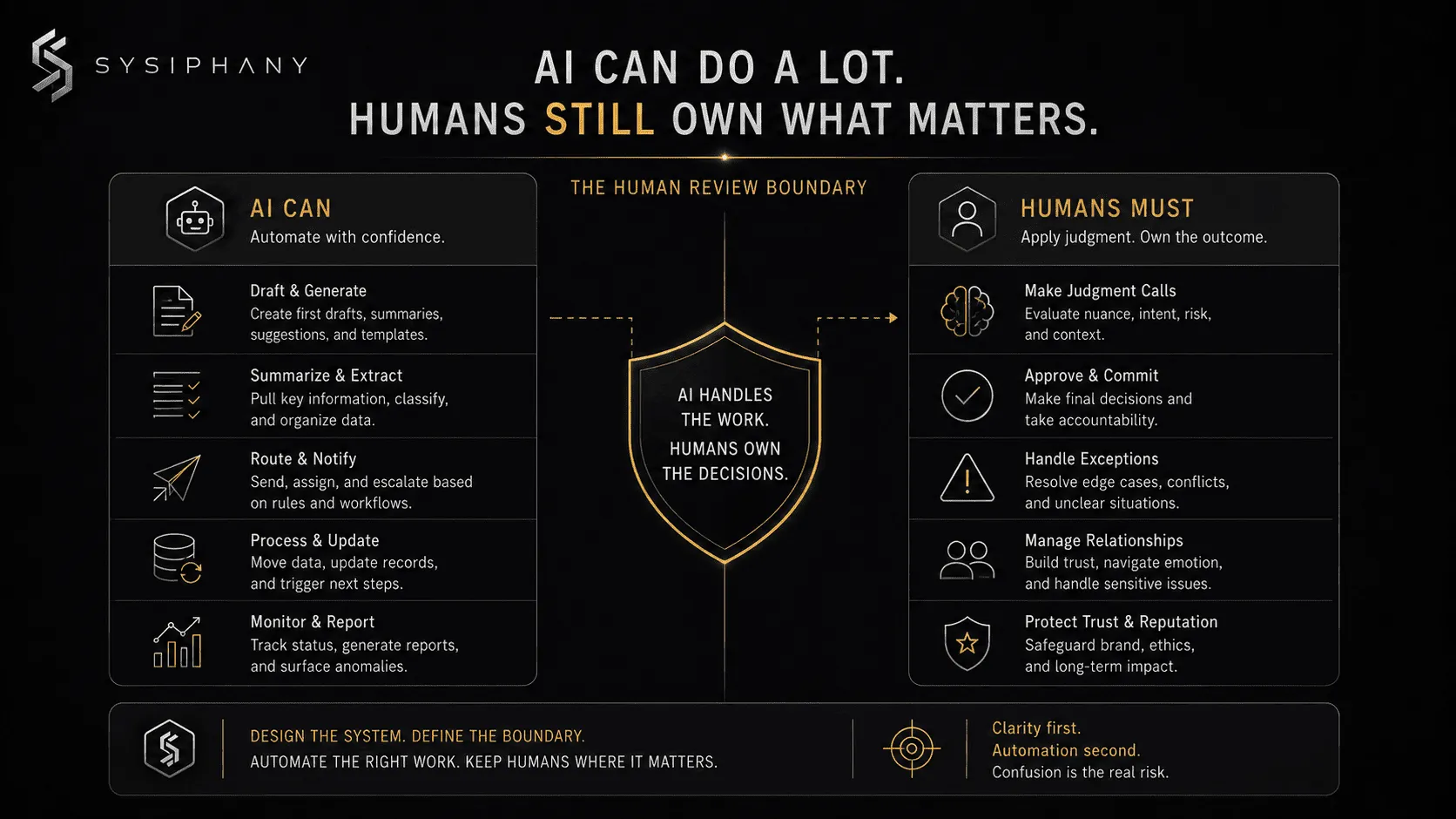 A simple rule:
AI can prepare, draft, summarize, sort, route, and recommend.
Humans should approve, decide, commit, escalate, and own the result.
That does not mean every workflow needs heavy manual approval.
It means the business should intentionally decide the review level.
Use three levels.
Level 1: AI drafts, human approves
Best for customer-facing messages, sensitive workflows, pricing, scope, complaints, and anything with relationship risk.
Level 2: AI acts, human audits
Best for low-risk internal updates, categorization, summaries, and routine task creation.
Level 3: AI acts automatically
Best for simple, reversible, low-risk workflows with clear rules and low downside.
Most small businesses should start at Level 1 or Level 2.
Level 3 comes later.
How do you measure whether AI automation is working?
You measure AI automation by tracking whether it reduces rework, response time, manual effort, missed handoffs, founder interruptions, and customer delays.
Do not only measure whether the automation runs.
Measure whether the workflow improved.
Useful metrics include:
- Hours saved per week
- Number of manual steps removed
- Response time reduction
- Fewer missed follow-ups
- Fewer founder escalations
- Fewer duplicate updates
- Fewer handoff questions
- Fewer customer issues caused by confusion
- Higher completion consistency
- Faster onboarding for team members
The best AI automation does not just make tasks faster.
It makes the business easier to operate.
That is the point of scaling operations without adding headcount. The goal is not to replace people. The goal is to stop wasting human attention on work that should already be clear.
A simple AI automation readiness checklist
Before automating a workflow, answer these questions:
- What exact workflow are we automating?
- What starts the workflow?
- What information does AI need?
- Where does that information live?
- Which source of truth controls the workflow?
- Who owns the outcome?
- What should AI produce?
- What should AI never do?
- What decision rules should it follow?
- What exceptions require escalation?
- Who reviews the output?
- What metric tells us the workflow improved?
If those answers are clear, automation may be useful.
If those answers are unclear, diagnose the drag first.
The practical starting point
AI automation for small business should begin with one workflow.
Pick one painful, repetitive workflow.
Map the trigger, input, source of truth, owner, decision rule, exception path, and review point.
Remove unnecessary steps.
Clarify the handoff.
Decide where humans stay involved.
Then automate the part that is stable enough to support.
That is how AI becomes useful inside a real business.
It helps clear workflows run with less manual drag.
Diagnose what to automate before adding another tool
Before you automate another workflow, identify where the work is actually breaking.
The Operational Drag Diagnostic Kit helps you identify the source-of-truth confusion, weak handoffs, unclear ownership, founder dependency, and decision-rule gaps that make automation harder than it needs to be.
Use it before buying another tool, building another Zap, or asking AI to take over a workflow your team does not fully trust yet.
If you already know the issue is bigger than one workflow, book a SYSIPHANY discovery call.
FAQ
What is the best AI automation for small business?
The best AI automation for small business is usually a repeatable internal workflow that saves time without removing human accountability.
Start with meeting summaries, lead intake, support triage, CRM updates, reporting preparation, or task creation. Avoid automating sensitive decisions until the rules and review points are clear.
What business processes should I automate first?
You should automate business processes that are repetitive, frequent, low-risk, and easy to review.
Good first candidates include intake, routing, reminders, summaries, reporting prep, follow-ups, and administrative updates. Do not start with unclear exceptions, pricing decisions, customer complaints, or founder-dependent judgment calls.
Can AI automate my whole business?
AI should not automate your whole business.
AI can support parts of your business by drafting, summarizing, routing, preparing, and organizing work. Humans still need to own judgment, accountability, customer trust, exceptions, and strategic decisions.
Why do AI automation projects fail?
AI automation projects fail when businesses automate unclear workflows, messy data, weak handoffs, or decisions that still depend on the founder’s hidden judgment.
The tool may function, but the operating logic around the tool is not clear enough to produce reliable outcomes.
Do I need an AI consultant for small business automation?
You may need an AI consultant if you are unsure which workflows to automate, which tools to use, how to prepare your data, or how to keep humans involved safely.
A useful AI consultant should diagnose workflows, ownership, source-of-truth issues, review points, and adoption risks before recommending tools.
What is the difference between workflow automation and AI automation?
Workflow automation moves work through predefined steps.
AI automation can interpret flexible inputs, draft outputs, summarize information, classify requests, and recommend next steps. Because AI handles more ambiguity, it needs clearer boundaries, review points, and escalation rules.
Should I buy AI tools before mapping my workflows?
No. Map the workflow first.
Buying AI tools before clarifying the workflow often creates more confusion. Start by identifying the task, trigger, owner, source of truth, decision rule, and human review point. Then choose the tool that supports the workflow.