AI is not the hard part.
The hard part is getting AI to work inside the business you actually have.
Not the business on the org chart.
Not the business described in the SOP.
Not the clean version from the vendor demo.
The real one.
The one where work starts in email, gets clarified in Slack, moves through a spreadsheet, waits on founder approval, gets copied into a project board, and somehow ends up in the CRM three days later.
That is where AI implementation either creates leverage or becomes another layer of mess.
Small businesses are adopting AI quickly. A 2025 U.S. Chamber of Commerce report found that 58% of small businesses said they use generative AI, up from 40% in 2024 and more than double the 2023 adoption rate.
That does not mean most businesses are ready for AI implementation.
Using ChatGPT is easy.
Building AI into daily operations is different.
Quick Answer: How do you implement AI in a business?
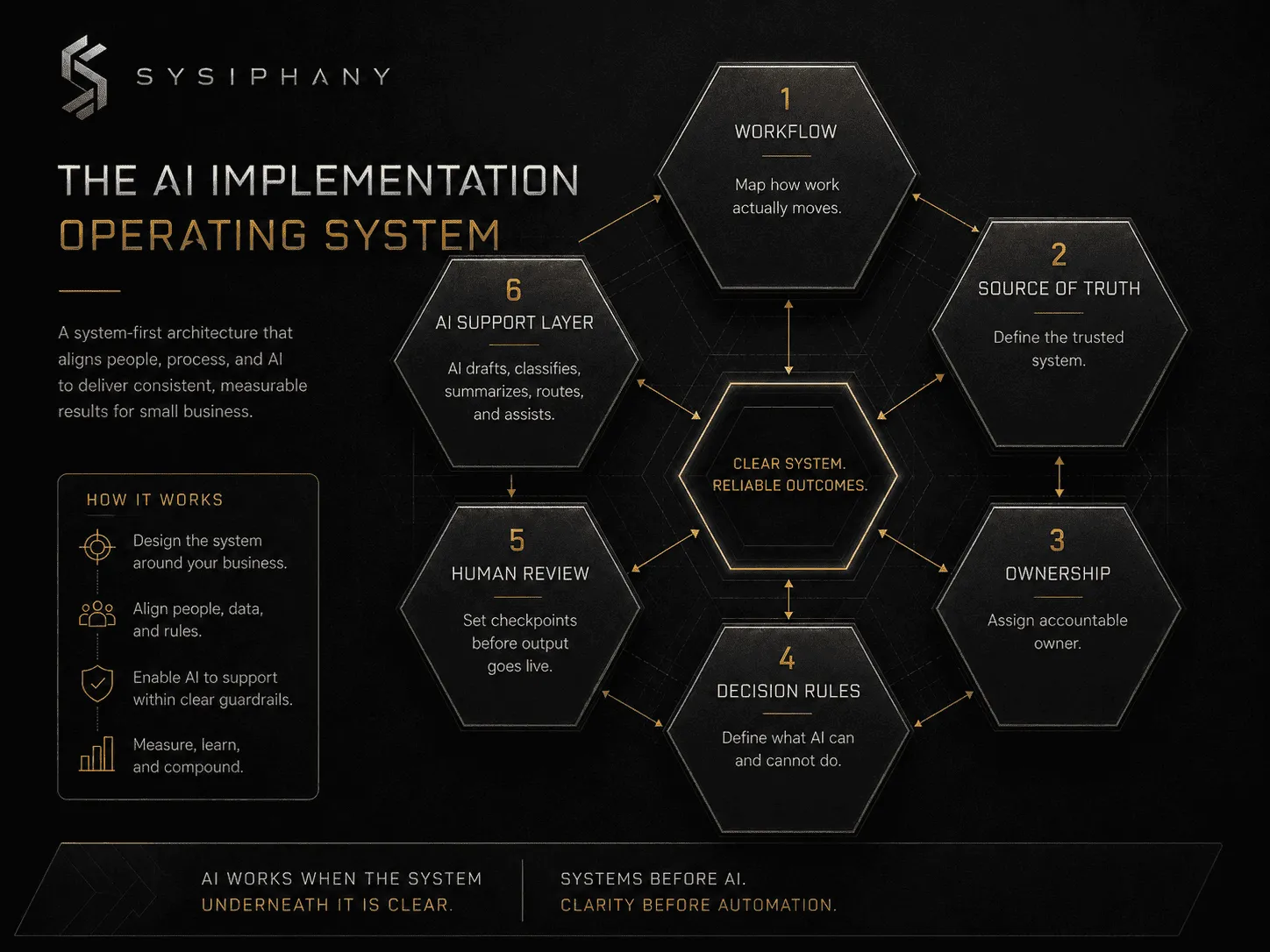
To implement AI in a business, start by mapping the workflow you want to improve, identifying the source of truth, clarifying ownership, defining decision rules, adding human review points, and introducing AI only where it can safely support the system.
In simpler terms:
Do not start with the tool.
Start with the work.
What is AI implementation for small business?
AI implementation for small business is the process of adding AI into real workflows so the business can reduce manual work, improve handoffs, prepare better decisions, and move faster without adding more confusion.
It is not the same as opening a ChatGPT account.
It is not the same as installing a chatbot.
It is not the same as buying an automation tool.
A real AI implementation changes how work moves.
That means it has to account for the workflow, the people, the data, the source of truth, the review points, and the moments where judgment still belongs to a human.
If those pieces are missing, AI may still produce output.
But output is not the same as operational leverage.
Most AI implementation advice starts in the wrong place
A lot of AI consulting sounds like this:
- “You need an AI strategy.”
- “You need custom AI agents.”
- “You need workflow automation.”
- “You need a chatbot.”
- “You need to integrate AI across the business.”
Maybe.
But maybe the business does not need AI first.
Maybe the business needs to know why the same work keeps getting repeated.
Maybe it needs one trusted source of truth.
Maybe it needs cleaner handoffs.
Maybe it needs decision rules that do not live entirely in the founder’s head.
AI can help with real operational work.
It can summarize, draft, classify, route, extract, prepare, flag, and analyze.
But AI needs a system to work inside.
If the workflow is unclear, AI has no stable path.
If the data is unreliable, AI has no reliable ground.
If ownership is vague, AI cannot fix accountability.
If decision rules are unwritten, AI cannot inherit judgment.
If nobody knows what “good” looks like, AI will confidently produce more work for someone to clean up.
That is not implementation.
That is automation theater.
Why is AI implementation not just tool installation?
AI implementation is not tool installation because a tool can be installed in a day, while implementation changes how work moves through the business.
That distinction matters.
An AI tool is the software.
An AI implementation is the operating change around it.
A real implementation answers questions like:
- What workflow is this improving?
- What problem is it solving?
- What data does it need?
- Which system is the source of truth?
- Who owns the workflow?
- What can AI do safely?
- What still needs human review?
- What happens when AI is wrong?
- How will the team actually use this?
- How will success be measured?
If those questions are not answered, the business is not implementing AI.
It is experimenting with tools.
Experiments are fine. They are how you learn. But they should not be confused with operating infrastructure.
Why does the operating system underneath AI matter?
The operating system underneath AI matters because AI plugs into how work already enters, moves, gets assigned, gets reviewed, and gets handed off.
Every business has an operating system.
Not software.
A practical operating system:
- how work enters
- how it gets assigned
- how decisions are made
- how information moves
- how exceptions are handled
- how quality is checked
- how the team knows what is true
- how work gets handed off
- how the founder stays out of routine decisions
AI plugs into that system.
If the system is clean, AI can create leverage.
If the system is messy, AI usually makes the mess move faster.
This is why an operational audit before AI implementation matters. Not to slow the business down. To avoid automating confusion.
What should you do before implementing AI?
Before implementing AI, map one workflow as it actually works today, including where work starts, who touches it, where it waits, where context gets lost, and what requires human approval.
Start with one workflow.
Not the whole company.
One workflow.
Good first candidates usually have three traits:
- The work happens often.
- The work has enough structure to explain.
- The work creates visible drag when it slows down.
Examples:
- client intake
- order processing
- quote preparation
- product listing creation
- vendor follow-up
- customer support triage
- proposal drafting
- document review
- weekly reporting
- internal task routing
- CRM cleanup
- invoice or payment follow-up
Pick one.
Then map how it actually works.
Not how it should work.
Not how the software says it works.
Not how the founder wishes it worked.
How it really works.
Ask:
- Where does the work start?
- What information is needed?
- Who touches it first?
- What happens next?
- Where does it wait?
- Where does context get lost?
- What gets copied manually?
- What needs approval?
- Where do errors usually appear?
- What does the team do when something does not fit the standard path?
- Who has to step in when the process breaks?
This map is more valuable than a tool recommendation.
Because once the workflow is visible, the AI opportunity becomes clearer.
Why does source of truth matter for AI implementation?
Source of truth matters for AI implementation because AI needs to know which system or record to trust when business information conflicts.
Most small businesses do not have a software problem first.
They have a source-of-truth problem.
The CRM says one thing.
The spreadsheet says another.
The Slack thread has the latest update.
The project board is missing the attachment.
The founder remembers the exception.
Then someone asks AI to help.
Help with what?
If the business cannot name which system wins when information conflicts, AI cannot solve that.
It can only guess from the inputs it has.
Before AI implementation, define:
- Which system owns customer data?
- Which system owns project status?
- Which system owns product information?
- Which system owns pricing?
- Which system owns vendor details?
- Which system owns final approvals?
- Which document, database, or tool should AI trust?
This does not have to be complicated.
It does have to be clear.
AI works better when the business has a trusted place for truth to live.
What should AI do — and what should it not do?
AI should be assigned a clear role inside the workflow: human-led work stays accountable to people, AI-assisted work supports people, and automated work moves defined steps when the rules are clear.
Not every part of a workflow should be automated.
Some work is repetitive.
Some work requires judgment.
Some work requires relationship context.
Some work requires accountability.
The mistake is treating all of it the same.
A better implementation separates work into three categories.
1. Human-led work
Humans should own:
- final approval
- sensitive client communication
- ethical judgment
- high-consequence decisions
- exceptions
- tradeoffs
- relationship management
- accountability
AI can prepare information for these decisions.
It should not silently own them.
2. AI-assisted work
AI is useful for:
- drafting
- summarizing
- classifying
- extracting information
- comparing documents
- preparing first-pass recommendations
- identifying missing information
- routing work to the right person
- turning messy notes into structured output
This is usually the safest starting point for AI implementation.
AI assists.
A person reviews.
The system improves.
3. Automated work
Automation is useful for:
- moving data between systems
- creating tasks
- sending notifications
- updating statuses
- routing standardized work
- triggering reminders
- generating recurring reports
This may or may not require AI.
Sometimes a simple automation is better than a complex AI workflow.
That is not a downgrade.
That is operational maturity.
What is the best first AI implementation for a small business?
The best first AI implementation for a small business is usually narrow, frequent, structured, low-to-medium risk, and tied to a workflow where drag is visible.
The first implementation should not try to transform the business.
It should make one real workflow easier.
A strong first use case might look like this:
- AI reviews inbound customer requests.
- It classifies the request type.
- It checks whether required information is missing.
- It drafts a response.
- It routes the item to the right person.
- A human reviews before anything goes out.
- The system logs the status in the source-of-truth tool.
That is not glamorous.
It works.
Another example:
- AI reads supplier PDFs.
- It extracts product details.
- It compares them against a required listing format.
- It flags missing fields.
- It drafts product descriptions.
- A human reviews and approves.
- The final information moves into the product database.
Again, not magic.
Useful.
The goal is not to make AI visible.
The goal is to make the work move correctly.
What boundaries do AI agents need in a small business?
AI agents need a narrow job, clear inputs, defined permissions, access to the right systems, escalation rules, human review points, and a way to recover when they fail.
AI agents are getting a lot of attention.
Some of that attention is earned. Some of it is noise.
An AI agent can be useful when it has:
- a narrow job
- clear inputs
- defined permissions
- access to the right systems
- escalation rules
- human review points
- a way to recover when it fails
Without those, an agent is just unsupported judgment with tool access.
That may be fine in a demo.
It is not how you run operations.
Before giving an AI agent more autonomy, ask:
- What can it access?
- What can it change?
- What can it send?
- What can it delete?
- What must it ask approval for?
- When should it escalate?
- How will we know it made a mistake?
- Who is accountable for the outcome?
This is where many AI implementations go sideways.
The question is not whether AI can do the task.
The question is whether the business has designed the boundaries around the task.
Zapier’s guide to human-in-the-loop automation describes a practical pattern: pause an automated workflow so a person can review before the workflow continues.
For a small business, the principle is simple.
AI can prepare, classify, draft, and route.
Humans still need to own judgment, exceptions, and accountability.
What should AI implementation include?
AI implementation should include a workflow map, source-of-truth review, ownership model, decision boundaries, human review points, integration plan, training, documentation, and success criteria.
If you hire an AI consultant, AI automation agency, or AI implementation partner, the deliverable should be more than a clever workflow.
A real AI implementation should include the following.
1. Workflow map
A clear picture of how the work currently moves.
This should include inputs, steps, owners, tools, handoffs, approvals, exceptions, and outputs.
If the workflow is not mapped, the implementation is guessing.
2. Source-of-truth review
AI needs reliable information.
A source-of-truth review identifies which systems should be trusted, where information conflicts, and what needs cleanup before AI enters the workflow.
3. Ownership model
Every workflow needs an owner.
AI does not remove ownership. It makes unclear ownership more dangerous.
Define who owns:
- the process
- the data
- the review
- the exceptions
- the outcome
- the ongoing maintenance
4. Decision boundaries
Write down what AI can do, what it can recommend, what it can draft, and what it cannot decide.
This is where implementation becomes operational instead of experimental.
5. Human review points
AI output needs review, especially early.
Review does not mean distrust.
Review means accountability.
Define where a human checks the work before it reaches a customer, changes a record, triggers a task, or affects a decision.
6. Integration plan
The implementation should fit the tools your team already uses where possible.
A new tool may be necessary.
A new tool should not become another place for work to disappear.
7. Training and documentation
If the team cannot use the system, the system is not done.
A proper implementation includes handoff documentation, training, and clear instructions for what to do when the workflow breaks.
8. Success criteria
Define the outcome before the build.
Examples:
- reduce manual data entry
- shorten response time
- lower rework
- reduce founder approvals
- improve routing accuracy
- reduce status-check messages
- increase throughput without adding headcount
If success is vague, the implementation will be vague.
A good AI implementation partner should be willing to improve the workflow before recommending the automation.
What are good places to start with AI in business operations?
Good places to start with AI in business operations are structured, repetitive, information-heavy workflows where AI can assist without owning the final judgment.
Here are seven practical starting points.
1. Client intake
AI can summarize intake forms, identify missing information, classify the request, and prepare the next step.
2. Customer support triage
AI can categorize messages, draft responses, identify urgency, and route issues to the right person.
3. Document processing
AI can extract fields, summarize contracts, compare PDFs, identify missing details, and prepare structured outputs.
4. Internal reporting
AI can turn raw notes, spreadsheets, or project updates into weekly summaries and exception reports.
5. Sales follow-up
AI can draft follow-up messages, summarize call notes, prepare next steps, and update CRM fields with human review.
6. Operations handoffs
AI can help package context before work moves from one person or team to another.
7. Knowledge retrieval
AI can help employees find answers from approved internal documentation instead of interrupting the founder or senior team.
These are not the only use cases.
They are good starting points because they are narrow enough to control and useful enough to matter.
The right starting point is not the flashiest workflow.
It is the workflow where clarity already exists, drag is visible, and the risk of being wrong is manageable.
Where should a small business not start with AI?
A small business should not start with AI where the workflow is unclear, the data is messy, no one owns the process, errors are hard to detect, the work involves sensitive judgment, or the founder is the only person who knows what “right” means.
Avoid first implementations where:
- no one owns the process
- the data is messy
- the decision rules are political
- errors would be hard to detect
- the work involves sensitive judgment
- the team already distrusts the system
- the workflow changes every week
- the founder is the only person who knows what “right” means
That does not mean AI can never help there.
It means the business needs operational clarity first.
How do you know if your business is ready for AI?
Your business is ready for AI when the workflow is clear, the source of truth is trusted, ownership is defined, decision rules are visible, handoffs are clean, exceptions are understood, and humans know where they remain accountable.
A business is not AI-ready because the team is excited.
It is not AI-ready because the founder watched a demo.
It is not AI-ready because competitors are talking about agents.
A business is ready for AI when the workflow is clear enough for AI to support without adding confusion.
Use this simple AI readiness check:
Workflow clarity
Can the team explain how work actually moves from start to finish?
Source-of-truth clarity
Can the team name which system owns the information AI should trust?
Ownership clarity
Does a person or role own the workflow?
Decision clarity
Can the team explain what AI may draft, classify, recommend, or route — and what still needs human review?
Handoff clarity
Does work move cleanly between people, tools, or teams?
Exception clarity
Does the team know what happens when the standard path does not apply?
Founder-dependency clarity
Can routine work move without waiting for the founder to interpret, approve, or remember what should happen?
If most of these are unclear, do not rush into AI implementation.
Clarify first.
What is the SYSIPHANY implementation sequence?
The SYSIPHANY implementation sequence is: remove, clarify, standardize, document, train, automate, and then add AI where it creates leverage.
The sequence matters.
Most businesses want to jump from pain to automation.
That is how they get brittle systems.
A better sequence:
1. Remove
First, remove work that should not exist.
Old approvals.
Duplicate reports.
Unnecessary handoffs.
Zombie spreadsheets.
Status meetings that only exist because the system cannot show status.
Do not automate work that should be deleted.
2. Clarify
Clarify the workflow, owner, source of truth, decision rules, and review points.
This is where the system starts to become visible.
3. Standardize
Standardize the parts of the workflow that repeat.
Not everything needs to become rigid.
But recurring work should not depend on memory.
4. Document
Document how the workflow works, what exceptions look like, and who owns what.
Documentation is not bureaucracy when it removes repeated questions.
It is infrastructure.
5. Train
Train the team before calling the system complete.
If people do not understand the workflow, they will route around it.
6. Automate
Automate low-risk, repetitive movement of work.
This may involve AI.
It may not.
7. Add AI where it creates leverage
Once the workflow is clear, AI can support the system with drafting, summarizing, extraction, routing, review preparation, and decision support.
That is when AI starts to work.
Not because the model is impressive.
Because the system underneath it is ready.
AI implementation partner vs AI consultant vs AI automation agency
An AI consultant usually helps with strategy, an AI automation agency usually builds workflows or integrations, and an AI implementation partner should help diagnose the workflow, design the operating model, build the system, train the team, and leave behind documentation.
The category is messy.
Here is a practical distinction.
AI consultant
Usually helps identify opportunities, use cases, strategy, or tool options.
Useful when the business needs direction.
Risk: you may end up with a strategy deck instead of a working system.
AI automation agency
Usually builds automations, agents, integrations, or workflows.
Useful when the process is already clear.
Risk: they may automate a broken workflow.
AI implementation partner
Should help diagnose the workflow, design the operating model, build the system, train the team, and leave behind documentation.
Useful when the business needs AI to work inside real operations.
This is the layer most founder-led businesses actually need.
Not more AI theory.
Not a bundle of disconnected automations.
A working system.
What are red flags when hiring AI implementation help?
Red flags when hiring AI implementation help include providers who start with tools before understanding the workflow, promise full automation before reviewing the process, ignore source of truth, avoid documentation, or cannot explain where humans remain accountable.
Be careful if a provider:
- starts with tools before understanding the workflow
- promises full automation before reviewing the process
- cannot explain where humans stay accountable
- does not ask about source of truth
- ignores team adoption
- avoids documentation
- sells open-ended hours without clear deliverables
- treats AI as the strategy
- cannot tell you when AI is the wrong answer
The right partner should be willing to say:
“This does not need AI yet.”
That is not a lack of ambition.
That is honesty.
What should good AI implementation feel like?
Good AI implementation should feel like work moving with less friction, fewer repeated questions, cleaner handoffs, faster intake, clearer ownership, and less dependence on founder heroics.
It should not feel like a science project.
You should see:
- fewer repeated questions
- cleaner handoffs
- faster intake
- fewer manual copy-paste steps
- clearer ownership
- better prepared decisions
- less founder routing
- more reliable follow-up
- fewer places where work disappears
- more confidence in what the team is using
The point is not to make your business look more AI-powered.
The point is to make your operations less dependent on heroics.
How do you start AI implementation without automating confusion?
You start AI implementation without automating confusion by diagnosing operational drag first, then deciding where AI belongs.
Do not start by asking:
“What AI tool should we use?”
Start here:
“Where is the business losing time, clarity, or control?”
That is operational drag.
Disconnected systems.
Manual coordination.
Duplicated work.
Unclear ownership.
Workflow fragmentation.
Founder dependency.
AI readiness risk.
Find that first.
Then decide where AI belongs.
Because AI implementation that actually works is not about adding intelligence to chaos.
It is about building a system clear enough for intelligence to compound.
For a related capacity lens, read Scaling Operations Without Adding Headcount.
Start here
Before you hire an AI consultant, buy another tool, or build your first AI agent, inspect the system underneath the work.
Before you automate a workflow, diagnose the drag inside it.
The Operational Drag Diagnostic Kit helps you find the unclear handoffs, duplicated work, source-of-truth gaps, and founder-dependent decisions that AI would otherwise inherit.
Start with the drag.
Then build the system.
Then add AI where it actually belongs.
Start with the Operational Drag Diagnostic Kit:
Start with the Operational Drag Diagnostic Kit
FAQ
What is AI implementation for small business?
AI implementation for small business is the process of adding AI into real business workflows in a way that improves operations. It usually includes workflow mapping, data review, tool selection, integration, human review points, team training, and documentation.
What is the best way to start using AI in my business?
The best way to start is to choose one repetitive, information-heavy workflow and map how it currently works. Then identify where AI can assist with drafting, summarizing, classification, extraction, routing, or review preparation.
Should I hire an AI consultant or an AI automation agency?
Hire an AI consultant if you need strategy and use-case guidance. Hire an AI automation agency if you already know the workflow you want automated. Hire an AI implementation partner if you need help diagnosing the workflow, designing the system, building it, and training your team.
What should I automate first with AI?
Start with workflows that are frequent, structured, and low-to-medium risk. Good candidates include client intake, customer support triage, document processing, internal reporting, sales follow-up, CRM cleanup, and routing repetitive work.
Why do AI implementations fail?
AI implementations often fail because the workflow underneath the tool is unclear. Common causes include messy data, no source of truth, unclear ownership, hidden decision rules, weak handoffs, poor team adoption, and no human review point.
How do I know if my business is ready for AI?
Your business is ready for AI when the workflow is clear, the source of truth is trusted, ownership is defined, decision rules are visible, handoffs are clean, exceptions are understood, and humans know where they remain accountable.
Do I need custom AI software?
Not always. Many businesses need clearer workflows, better documentation, simple automations, or AI-assisted processes before they need custom software. Custom AI should follow operational clarity, not substitute for it.
Can AI replace employees in a small business?
AI is usually more useful as support than replacement. It can reduce repetitive work, prepare information, draft responses, summarize documents, and route tasks. Humans should remain responsible for judgment, exceptions, relationships, and final accountability.