Consider an AI agent only when the workflow is already clear but the route through it changes from case to case. If every valid case follows the same steps, ordinary automation is usually the better tool.
If the work follows stable rules, use conventional automation. If a person needs help drafting or interpreting one item, use an AI assistant. Give an agent access to tools only when the job genuinely requires multi-step decisions, the possible actions are bounded, and the business can see what it did.
The hard question is not whether an agent can perform the task. It is how much authority the task deserves.
Quick answer: When should a small business use an AI agent?
Use an agent when the workflow has a clear finish, but the software must inspect the current case and choose among several allowed next steps to get there.
Use an agent only if all five conditions hold:
- The operating goal and definition of done are clear.
- Handling the valid variations with fixed rules would cost more to build and maintain than the agent plus its review work.
- The agent’s tools, data, and permitted actions can be restricted.
- Consequential actions have explicit approval gates.
- The business can inspect, stop, and recover the work.
If one of those is missing, reduce the autonomy or choose a simpler design.
Start with a named workflow. If you are still choosing the process or checking whether the business is ready for AI, use How to Automate a Business Process or the AI Readiness Assessment first. This guide answers the next question: does this workflow need an agent, and what authority should it receive?
What is an AI agent in a small business?
An AI agent is software that receives a goal, evaluates the current situation, chooses from allowed actions, uses tools or systems, checks what happened, and continues until it reaches a stop condition or hands the work to a person.
That choice of action is the important part. A standard automation follows a path that a designer specified in advance. An agent can decide which permitted path to take next.
For example, a fixed automation can send a reminder three days after a quote is issued. An agent could inspect the quote status, read the latest customer email, check whether required documents are missing, prepare the appropriate follow-up, and decide whether to create an internal task or request human review. It is acting toward a goal across several steps rather than firing one rule.
Anthropic makes a useful distinction in Anthropic’s “Building effective agents”: workflows follow predefined code paths, while agents dynamically direct their own process and tool use. The same article recommends starting with the simplest architecture that meets the need because additional agentic complexity often brings more latency and cost. That is sound operating advice for a small business. Freedom is not a feature unless the workflow benefits from it.
What is the difference between an AI agent, automation, a copilot, and a chatbot?
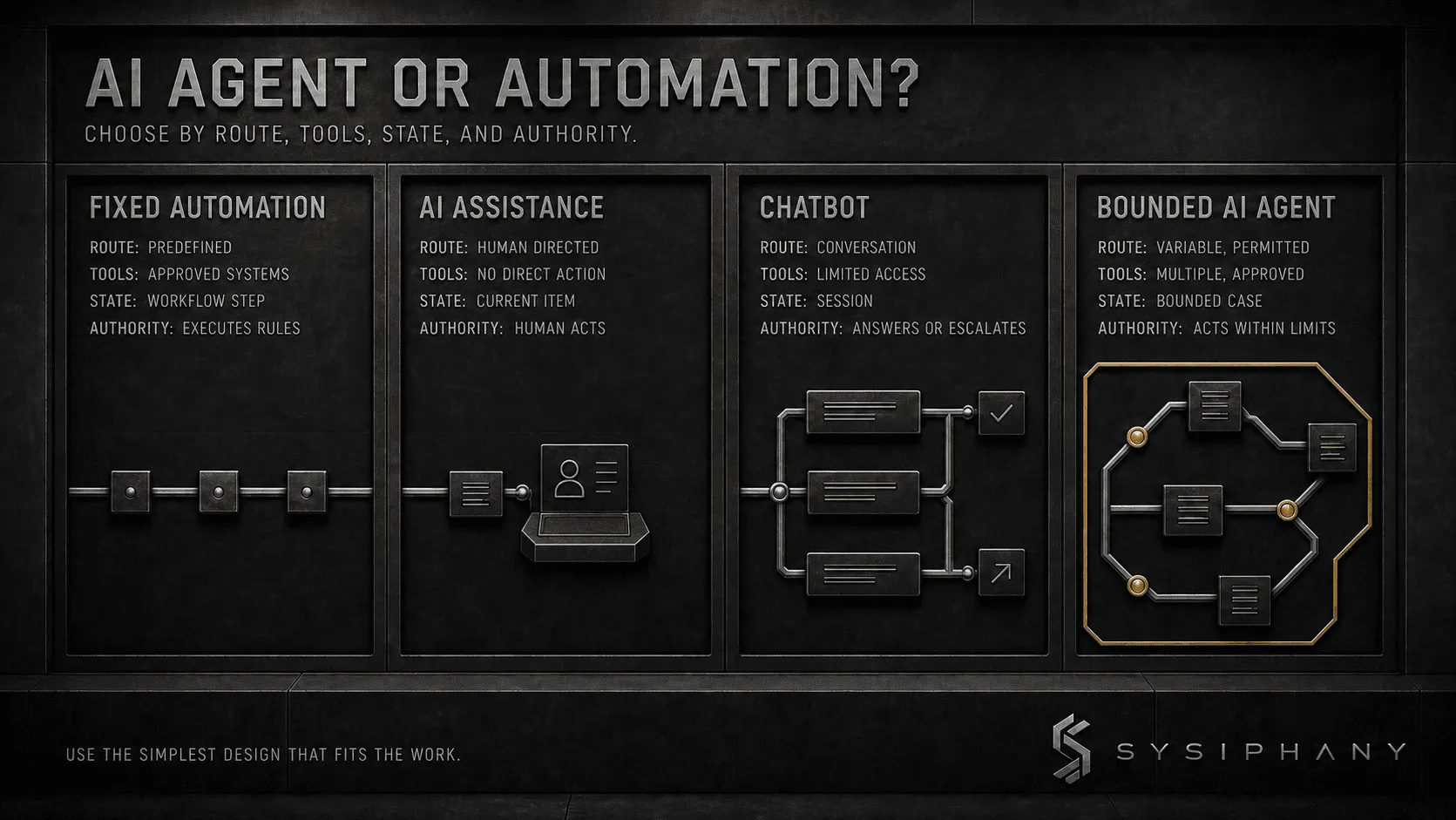
The difference is who chooses the next action and whether the software can change systems.
| Design | What it does | Who chooses the path? | Typical authority |
|---|---|---|---|
| Fixed automation | Executes known rules and steps | Workflow designer | Updates approved fields, routes records, sends fixed notices |
| AI assistant or copilot | Interprets, summarizes, extracts, or drafts | Human user | Produces a recommendation or draft; human acts |
| Chatbot | Holds a conversation within a defined knowledge and escalation boundary | Conversation logic, model, and user | Answers, collects information, or routes; system access varies |
| AI agent | Chooses among permitted actions to pursue a goal across tools and steps | Agent within its operating boundary | Reads, prepares, updates, or acts according to granted permissions |
These designs can be combined. A rules-based workflow may call AI to classify an email and then pause for approval. A chatbot may create a support ticket but have no permission to change an order. An agent may prepare a sequence of actions while a person approves the customer-facing step.
Do not label every multi-step automation an agent. The label does not improve the operation. It can, however, hide where decision authority moved.
How do you know whether a workflow actually needs an agent?
Start with the cases that break the normal path. If the variation is legitimate, frequent, and expensive for a person to route manually, an agent may have a job. If it comes from missing rules or disputed data, fix that first.
Use the following suitability test against the workflow, not the product demo.
1. Does the route change for valid reasons?
An agent may help when the next step depends on the content of a message, the state of a record, the result of a tool call, or a combination of conditions that cannot be reduced to stable rules without creating an unmanageable decision tree.
If the route changes only because the process is undocumented, the business has a clarity problem. An agent would learn to navigate confusion, not remove it.
2. Must the system use several tools to finish the job?
Agents are most defensible when they need to gather context, act in one system, inspect the result, and then choose the next allowed action. Reading an inbox, checking a CRM, preparing a document, and opening a task needs an agent only if the result of one step changes which permitted step comes next.
One prompt in and one draft out is AI assistance. It does not need an agent.
3. Does the work require bounded task state?
The system may need to remember what has already happened within one case: which records were checked, what is still missing, whether a reviewer rejected a draft, and which retry has already failed.
That state should be narrow and purposeful. “Remember everything forever” is not a requirement. It is an unmanaged data policy.
4. Can success and failure be observed?
The workflow needs a concrete finish: the complete intake packet is ready for review, the approved follow-up has been sent, or the unresolved case is in the correct queue with an owner. The agent also needs observable failure states, including missing data, a rejected action, a tool error, and an expired deadline.
Without a definition of done, an agent can stay busy without completing useful work.
5. Is the expected gain larger than the control burden?
Count the full operating cost: review time, exceptions, monitoring, investigation, model and tool usage, false actions, and recovery. If a fixed workflow takes six minutes and the agent saves four but creates five minutes of checking, the agent created work.
Use a simple per-case comparison:
manual handling time − agent review and exception time − recovery time = net time saved
Track tool and model spend separately. If net time saved is not positive during the pilot, do not expand the agent’s authority.
That calculation will disqualify many clever ideas, which is useful: architecture should remove effort rather than win a demo.
| Workflow condition | Better first design |
|---|---|
| Stable input, stable rule, known action | Fixed automation |
| Variable input, one interpretation, human takes the action | AI assistant |
| Website conversation with a defined knowledge boundary | Chatbot |
| Variable route, multiple tools, bounded state, observable goal | AI agent |
| Unclear ownership, disputed data, changing rules | Repair the workflow before adding AI |
| High-consequence decision with no reliable approval gate | Keep the decision human-led |
What should an AI agent be allowed to do?
An AI agent should receive the minimum authority required to complete its bounded job. Access should be granted by action and consequence, not by convenience.
“CRM access” is too vague. The agent may need permission to read contact and opportunity fields, but not change pricing, close an opportunity, delete records, export the database, or send a commitment in a salesperson’s name.
A practical autonomy ladder has four levels:
Level 1: Recommend
The agent gathers context and proposes a next action. A person decides whether anything happens.
Use this when the business is learning how the agent reasons, the consequences are material, or the acceptable conditions are not yet well evidenced.
Level 2: Prepare
The agent prepares the draft, record update, task, or transaction, then submits it for approval. Nothing consequential leaves the business or changes the source of truth until a person approves it.
For many small businesses, this is the safest place to begin with quotes, refunds, customer messages, and source-record changes: the agent prepares the work, and the current authority holder approves it.
Level 3: Act within approval thresholds
The agent can complete low-consequence actions that fall inside written limits. Anything outside those limits pauses for review.
A collections agent might send an approved reminder template for invoices fewer than 15 days late, but escalate disputed invoices, partial payments, strategic accounts, and any message that proposes new terms.
Level 4: Bounded autonomous action
The agent can select and execute actions without case-by-case approval inside a narrow operating envelope. The limits, logs, stop conditions, and owner still apply.
Consider this level only after production logs show that the action is reliably correct, reversible, easy to detect when wrong, and cheaper to oversee than to perform manually. Autonomy is earned by the workflow, not granted because the software supports it.
What belongs in an agent operating contract?
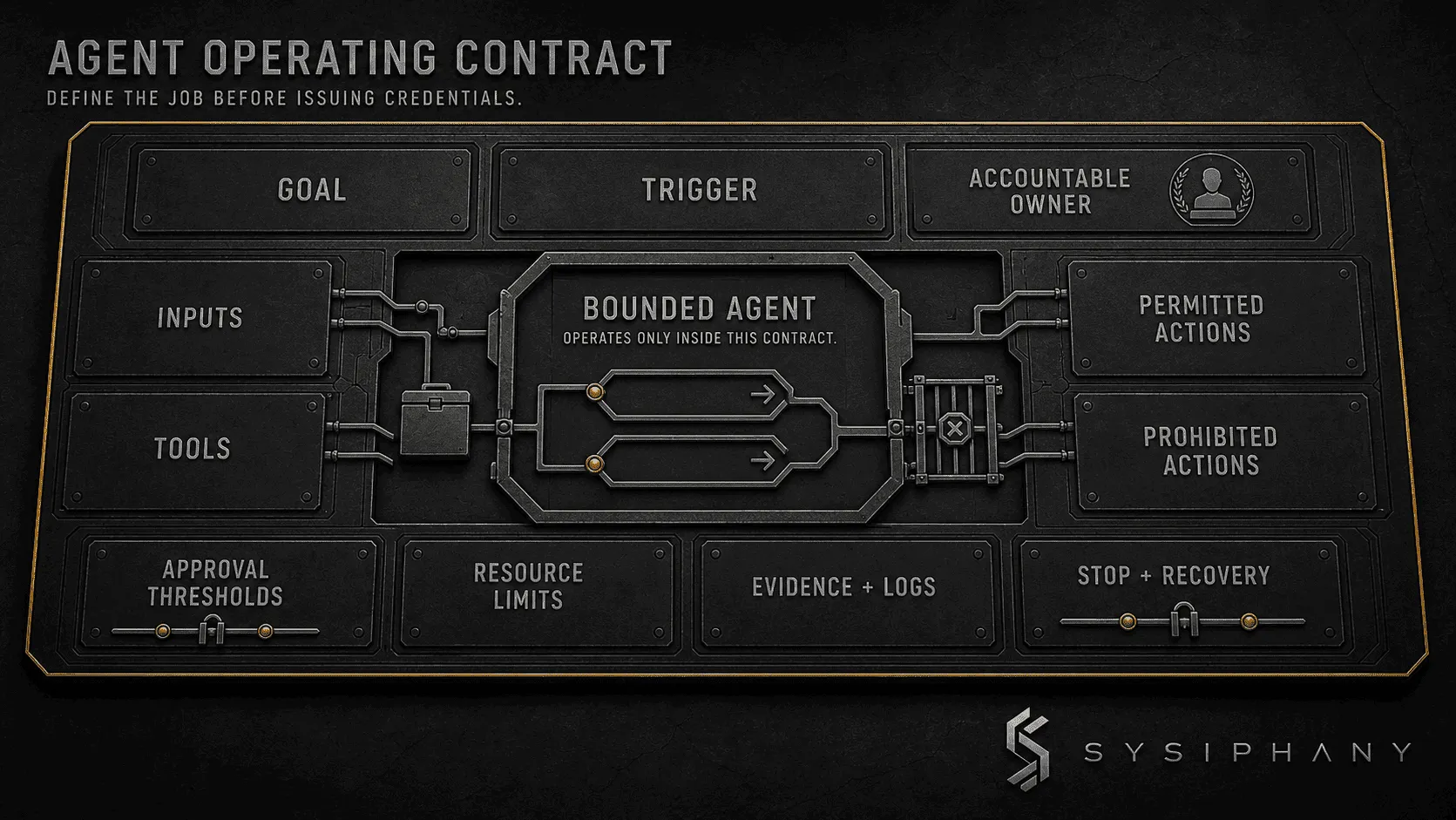
An agent operating contract is a one-page specification of the job, authority, limits, evidence, and recovery path. The workflow owner and system administrator should be able to review it together before any credentials are issued.
| Contract field | Question it must answer | Example |
|---|---|---|
| Goal | What operating result is the agent pursuing? | Assemble a complete quote-review packet within four business hours |
| Trigger | What starts one run? | Qualified request enters the quoting queue |
| Inputs | Which records may it use? | Approved request form, current customer record, current price list |
| Tools | Which systems and functions may it call? | Read CRM; read price list; create draft in quoting system; create internal task |
| Permitted actions | What may it do without approval? | Request missing internal data; prepare a draft; assign a review task |
| Prohibited actions | What may it never do? | Change prices; send a quote; alter payment terms; delete a record |
| Approval thresholds | Which conditions force a pause? | Non-standard discount, missing margin data, new legal term, total above $10,000 |
| Resource limits | How much time, spend, and retrying are allowed? | 10-minute runtime; two retries per tool; pilot budget translated into a written daily usage ceiling |
| Evidence and logs | What must be recorded? | Inputs used, tool calls, proposed changes, approval, final state, failure reason |
| Stop and recovery | When must it stop, and how does work resume? | Stop on conflicting prices; route to quote owner; preserve case state |
| Accountable owner | Who accepts the operating result and changes the contract? | Sales operations manager |
Write the prohibited actions explicitly. A list of allowed tools does not state which functions inside those tools are forbidden.
Also separate the agent’s goal from the business’s policy. The agent can pursue “complete the quote packet.” It should not invent discount policy in order to achieve that goal faster.
How should permissions and approvals work in practice?
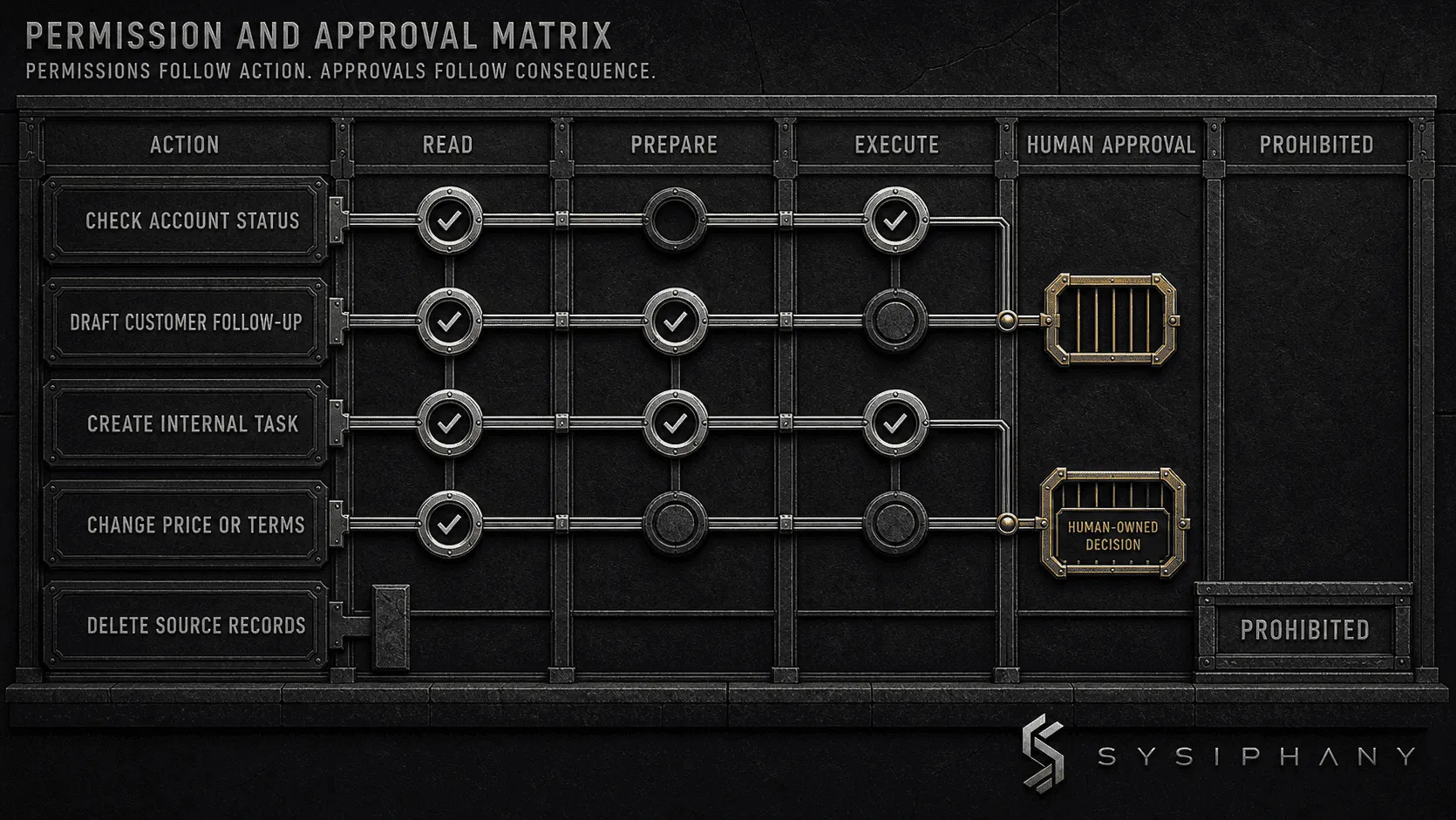
Permissions should follow the smallest useful action set, while approvals should follow consequence.
A simple matrix makes the boundary visible:
| Action | Agent may read | Agent may prepare | Agent may execute | Human approval |
|---|---|---|---|---|
| Check account and request status | Yes | N/A | Yes | No |
| Ask an internal owner for missing information | Yes | Yes | Yes, approved template only | No |
| Draft a customer follow-up | Yes | Yes | No | Always before sending |
| Create an internal task | Yes | Yes | Yes | No, if assigned within the workflow team |
| Change price or payment terms | Yes | No | No | Decision stays human-owned |
| Mark quote as accepted | Yes | No | No | Requires authoritative customer acceptance |
| Export customer records | No | No | No | Prohibited |
| Delete or overwrite source records | No | No | No | Prohibited |
The matrix should be enforced in system permissions where possible. A policy document that says “do not send” is weaker than credentials that cannot send.
Approval also needs a timeout. If nobody responds, the agent should not interpret silence as permission. It should pause, escalate to a named backup, or close the run with an unresolved status.
What can go wrong with AI agents in a small business?
Agent failures can become operational failures because the software may change records, trigger messages, or move work across systems before a person reviews the result.
Goal drift
The agent pursues the stated target in a way the business did not intend. A goal such as “reduce overdue invoices” can encourage inappropriate pressure unless communication limits, dispute handling, account sensitivity, and approval thresholds are part of the contract.
Tool misuse
The agent calls the wrong function, changes the wrong record, or uses a permission that was broader than the job required. Least-privilege access limits the damage, but the action still needs an audit trail.
Loops and runaway cost
The agent retries a failed step, reads the same records, or keeps revising work without approaching completion. Set tool-specific retry limits, total runtime, usage ceilings, and a terminal failure state.
Stale or contaminated memory
The agent carries old instructions, superseded customer facts, or context from one case into another. Define which state persists, for how long, and from which authoritative source it can be refreshed. Case boundaries matter.
Unauthorized commitments
A draft becomes a sent message, a provisional number becomes a quote, or a suggested date becomes a promise. Customer, financial, legal, and employment commitments require a deliberate authority boundary.
Silent partial completion
The agent completes three of four steps and reports success because no final check exists. The workflow needs an observable definition of done and a reconciliation step that confirms every required artifact and system state.
Orphaned exceptions
The agent recognizes that it cannot proceed and places the case in a queue nobody owns. That is not safe escalation. It is hidden work. Every exception route needs an owner, response window, fallback owner, and resumption rule.
How do you test an AI agent without giving it too much control?
Test the operating contract before expanding authority. The agent-specific cases matter most:
- An instruction embedded in untrusted content asks it to ignore the contract.
- A legitimate request would require a prohibited tool or action.
- Context from one customer or case appears in another.
- The reviewer rejects the proposed action or never responds.
- The run reaches its time, cost, or retry limit.
- The agent claims completion while a required system update is missing.
For each pilot case, record the outcome, manual baseline time, agent runtime and cost, human review time, exception-handling time, incorrect or blocked actions, and final recovery state. Then calculate net time saved after oversight, not before it.
Set the promotion rule before the pilot. At minimum, require zero unauthorized actions, positive net time saved, complete logs, and an acceptable error threshold chosen by the workflow owner. Expand authority only for the actions that pass.
For the general pilot, testing, and rollout method, use How to Automate a Business Process. AI Implementation for Small Business owns the broader implementation sequence, while Workflow Automation for Small Business covers triggers, handoffs, monitoring, and recovery architecture.
When does an AI agent create more work than it removes?
An AI agent creates more work when the business has to inspect every step, repair frequent exceptions, reconcile conflicting records, investigate unexplained actions, or keep a founder available to settle routine decisions.
Watch for these signals:
- Review takes as long as doing the work manually.
- The agent opens more tasks than it closes.
- Staff recheck source records because they do not trust the output.
- Exceptions arrive without enough context to resolve them.
- Tool and model costs rise while cycle time stays flat.
- The workflow owner cannot explain why an action occurred.
- People create shadow spreadsheets to monitor the agent.
- The agent needs broad access because the source of truth is unclear.
Do not respond by adding another layer of AI to supervise the first. Reduce the scope or autonomy, remove unnecessary steps, and repair disputed data. If several systems disagree about what is true, use the source-of-truth review before giving the agent broader access. If a fixed rule can replace a variable decision, use the rule.
The best outcome may be a smaller agent, an assistant that only prepares work, or no agent at all.
If these warning signs are present and the workflow is still hard to explain, Download the Operational Drag Diagnostic Kit before choosing an agent platform.
FAQ
What are practical AI agent use cases for a small business?
Practical candidates include assembling review packets from approved systems, coordinating missing information across an internal workflow, monitoring multi-step cases, preparing follow-up actions, and routing exceptions with complete context. Keep high-consequence customer, financial, legal, and employment commitments behind an authorized human approval gate. Lower-consequence actions may be automated only inside written thresholds and enforceable permissions.
Does an AI agent need persistent memory?
Often, no. Many agents need state only for the current case: what they checked, which action failed, and what still requires review. Persist information only when the job requires it, set a retention period, and refresh business facts from the authoritative system rather than trusting old agent memory.
What should happen when an AI agent reaches its cost or retry limit?
It should stop cleanly, preserve the case state and log, and route the unresolved work to the named owner. It should not reset its own budget, keep retrying through a different tool, or treat partial completion as success.
Who is accountable when an AI agent makes a mistake?
Do not assign accountability to the agent. Name a workflow owner who accepts the operating result, reviews exceptions, approves permission changes, and decides whether the agent remains in service. Legal responsibility should be assessed separately for the business, jurisdiction, and use case.
Bring one bounded agent idea into review
Bring one real workflow into review: Book a SYSIPHANY discovery call. We will pressure-test whether it needs an agent, identify the smallest useful authority level, and outline the controls required before you choose a platform.
If the workflow itself is still difficult to name, use the Operational Drag Diagnostic Kit linked above before giving software permission to act.